

Too busy to read? Listen to this article instead.
Most Amazon PPC advice is written for accounts spending a few thousand dollars a month. Once an account crosses $500K, five specific problems start eating real money, and none of them show up as a red flag on the dashboard. This breaks down what those five leaks actually are and how to catch each one before it compounds.
This breaks down what those five Amazon PPC ad leaks actually are, why they only show up at this scale, and how to catch each one before it compounds into a much bigger problem.
What Changes in Your PPC Account After $500K?
A 2% leak on $20,000 in monthly ad spend comes out to $400. Annoying, but not something you’d panic about. Now take that same 2% leak on $200,000 in monthly spend: that’s $4,000 gone every single month, and most sellers never catch it because the dashboard still shows a decent ACoS.
That’s what happens to Amazon PPC ads once you’re spending at this level. The metrics that used to warn you when something was off stop working the same way, because once your budget gets big enough, small inefficiencies just blend into the noise. A campaign can look fine on paper while it quietly bleeds money in the background. The five leaks below only show up once an account reaches this size. They’re not rookie mistakes; they’re problems that only exist because the account got big enough to hide them.
What Are the 5 Silent PPC Leaks for Amazon Brands Making $500K+/Month?
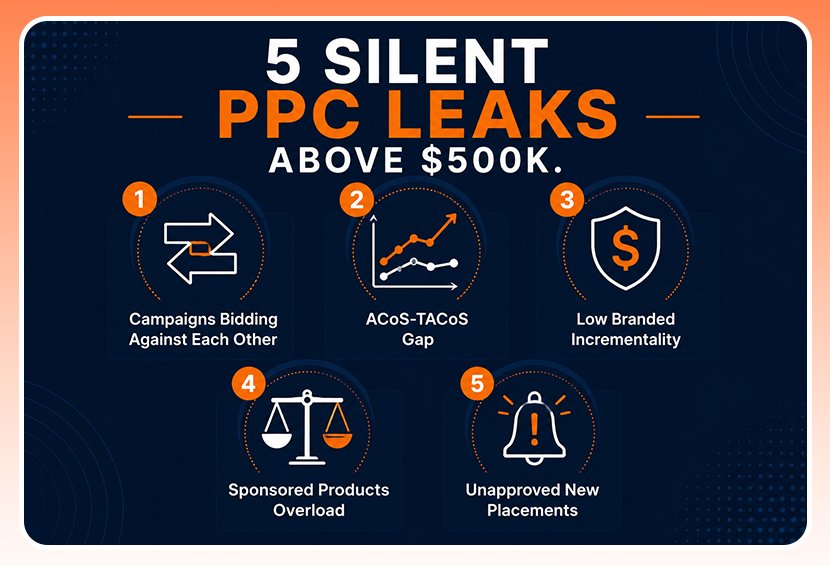
Above $500K, the five silent PPC leaks are: campaign keyword overlap, a rising TACoS hidden behind a stable ACoS, low-incrementality branded campaigns, over-reliance on Sponsored Products, and unapproved auto-enrolled placements.
Here is a breakdown of all 5 leaks:
Leak 1: Is Campaign Overlap Quietly Splitting Your Data and Budget?
This is the one almost nobody checks. As accounts grow, they end up running auto campaigns, broad match campaigns, exact match campaigns, and branded campaigns all at once, often layered on top of each other over the years without anyone cleaning house.
Here’s what actually happens. The same keyword ends up live in three or four different campaigns simultaneously. Amazon won’t let two of your own ads compete for the same auction slot, it always shows one, so this isn’t your campaigns literally bidding against each other. The real damage is quieter than that. Your conversion data gets split across multiple campaigns instead of consolidating in one place, which makes it harder to tell what’s actually working. Budget gets fragmented across duplicate targeting instead of concentrating on your best-performing campaign. And if you’re bidding on keywords you already rank for organically, you’re paying for clicks you might have gotten for free, a separate problem called sales cannibalization.
Automated Amazon PPC tools make this worse, not better, if nobody’s watching the overlap. Auto campaigns are built to find new keywords, but they don’t know that a keyword they just picked up is already running in three other campaigns you set up last year. The system optimizes each campaign in isolation. Nobody’s optimizing the account as a whole, which is exactly the kind of gap Amazon PPC management services are built to catch.
The fix isn’t complicated once you know to look for it, though it’s not the kind of thing a generic Amazon PPC guide walks you through either. Pull a bulk file export of every active campaign and check for the same search term appearing in more than one place. For each duplicate, pick the strongest-performing campaign to own that keyword and add it as a negative in the others. That’s how you stop the data fragmentation and start seeing clean, consolidated performance for the first time.
Leak 2: Is Your ACoS Clean While Your TACoS Climbs?
This is the leak that does the most damage because it looks like nothing’s wrong. Your Amazon PPC ACoS report says you’re fine. Your total advertising cost of sale, or TACoS, tells a different story, and almost nobody checks it side by side with ACoS.
Here’s the mechanism. ACoS only measures ad spend against ad sales. TACoS measures ad spend against total revenue, organic and paid combined. If your ACoS stays flat but your TACoS keeps climbing, it means ads are making up a bigger share of your total sales every month, which usually means your organic rank is quietly slipping and ads are the only thing propping up the numbers.
Most sellers above $500K in revenue never catch this because they check ACoS weekly, and TACoS never. By the time it shows up as a real problem, ad spend has been climbing for months to compensate for organic traffic that’s already gone.
Pull both numbers side by side, monthly, going back six months. If ACoS is stable but TACoS is trending upward, that’s not an advertising problem. That’s a listing and ranking problem wearing an advertising costume, and no amount of bid adjustment fixes it. The Amazon PPC metrics that actually matter go well beyond what most sellers check by default, and TACoS is usually the first one people skip.
Leak 3: Are Your Branded Campaigns Actually Earning that ROAS?
Branded campaigns almost always show the best numbers in the account. Low ACoS, high ROAS, easy conversions. It feels like the best money you’re spending.
Here’s the catch. A lot of that “performance” is just capturing shoppers who already searched your brand name and were going to buy anyway, with or without the ad. You’re paying for a sale that was already coming. This is called incrementality, and it’s one of the most sophisticated concepts in Amazon PPC marketing, which is exactly why almost nobody talks about it outside of Amazon PPC agency content.
The way to actually test this is to pause a branded campaign for a short, controlled window and watch what happens to total branded search sales, ad plus organic combined. If total branded sales barely move, that spend was mostly capturing demand you’d have gotten for free. If total sales drop meaningfully, the campaign is doing real work defending against competitors bidding on your name.
This doesn’t mean cut every branded campaign. It means stop assuming a great ROAS on branded terms is proof that the spend is working. Sometimes it’s proof you’re paying for something that was already yours.
Leak 4: Is Sponsored Products Carrying a Job It Wasn’t Built For?
Most accounts above $500K still put the majority of their ad budget into Sponsored Products alone, mainly because it’s the format sellers understand best, and it converts most directly.
The problem is that Sponsored Products was never meant to carry the entire funnel by itself. Sponsored Brands builds awareness and protects your branded search real estate from competitors. Sponsored Display retargets people who looked at your listing, or a competitor’s, and didn’t buy. Skip both, and you’re leaving discovery traffic and recoverable, almost-converted shoppers on the table every single day.
Top Amazon PPC advertising at this revenue level treats all three ad types as one coordinated system instead of three separate line items competing for the same budget. A reasonable starting mix is a heavier weighting toward Sponsored Products, with a smaller but real allocation to Sponsored Brands for defense and Sponsored Display for retargeting, adjusted based on what your category actually needs.
If your account has run 90 percent Sponsored Products for over a year without ever testing the other two seriously, that’s not a strategy. That’s a default nobody revisited.
Leak 5: Did Amazon Just Add a New Placement You Didn’t Approve?
This one is new, and it’s the leak most sellers haven’t actually checked yet. In March 2026, Amazon began auto-enrolling every seller’s campaigns into Sponsored Products Prompts, a new AI-driven placement tied to Amazon’s shopping assistant. No opt-in required, no notification, most sellers actually noticed.
For an account spending a significant amount in a month, a new placement type quietly added to the mix is exactly the kind of thing that gets lost in the noise. It’s a new line item charging per click, running inside campaigns sellers already trust, without anyone deciding whether it’s actually worth the spend.
Check your placement reports for anything tied to this new prompt-based placement. If it’s live in your account and nobody made an active decision to include it, that’s worth reviewing before it quietly becomes a permanent part of your spend.
How Do You Conduct a PPC Audit for an Account This Size?
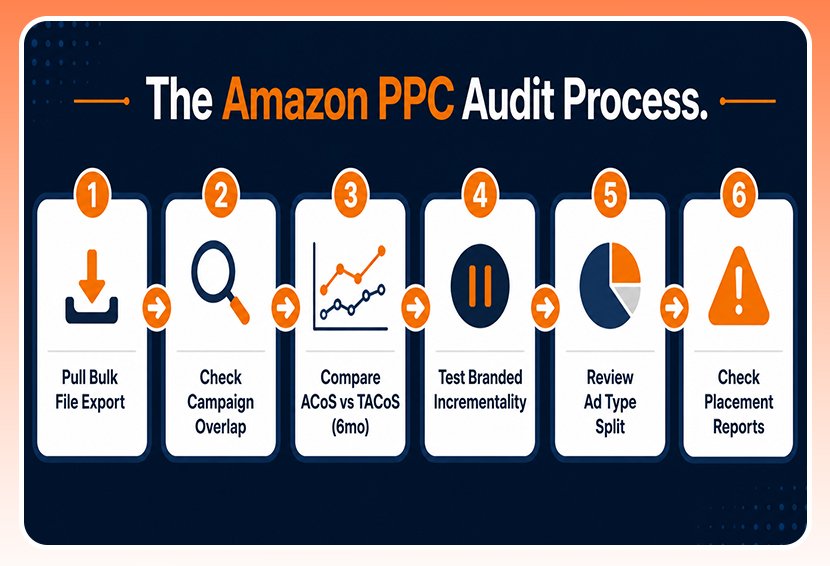
This isn’t the kind of thing a generic Amazon PPC guide covers, but a proper audit for accounts above $500K starts with a full bulk file export, not just the Seller Central dashboard. The dashboard is built to reassure you. It shows summary numbers, averaged trends, and top-line metrics that look fine right up until they don’t. The bulk file is different. It shows every campaign, every keyword, every search term, and every placement at once, which is the only way to actually see where money is leaking instead of just how much.
From there, work through the five leaks in order, since each one builds on catching the last:
- Check for Campaign Overlap First: This is the fastest win in the whole audit. Pull every active campaign and look for the same search term showing up in more than one place. It usually takes an afternoon and often turns up the most obvious waste in the account.
- Compare ACoS Against TACoS Over a Six-Month Window: Pull both numbers side by side, month by month. A flat ACoS with a climbing TACoS is the clearest sign that organic rank is slipping, and ads are quietly covering for it.
- Test Incrementality on the Top Branded Campaign: Pause it for a short, controlled window and watch what happens to total branded sales, ad, and organic combined. This is the only real way to tell if that spend is defending the brand or just paying for sales that were coming anyway.
- Review the Ad Type Split Against Category Norms: Most accounts over-rely on Sponsored Products because it’s familiar, but that usually means Sponsored Brands and Sponsored Display aren’t getting a fair test.
- Check Placement Reports for Anything New that Got Auto-enrolled Without Approval: Amazon adds new placement types more often than most sellers track, and each one is a new way to spend money without anyone actually deciding to.
This isn’t a one-time cleanup. Run the full audit quarterly at a minimum. Accounts at this scale move fast enough that a leak worth a few hundred dollars in January can quietly turn into a five-figure problem by June if nobody’s checking.
How Can You Improve Amazon PPC Campaigns for Better Sales?
Better sales at this stage rarely come from bigger budgets. It comes from finding where the current budget is already leaking and redirecting it toward what’s actually converting. Start with the two leaks most likely to be silently draining spend right now: campaign overlap and the ACoS-TACoS gap. Both are measurable within a single afternoon using reports that are already free inside Seller Central. Fix those two first, then move through the ad type mix and incrementality testing once the obvious waste is cleared.
An Amazon PPC specialist who works inside accounts at this scale every day usually catches these patterns faster than a founder checking in once a quarter, mainly because they’ve seen the same five leaks show up in dozens of other accounts first. Getting the bidding strategy fundamentals right underneath all of this makes every other fix more effective, too.
Conclusion
None of these five leaks shows up because a seller did something wrong. They show up because the account got big enough to hide them, and the same reports that worked fine at $50K stop telling the whole story at $500K. Campaign overlap, the ACoS-TACoS gap, branded incrementality, an unbalanced ad type mix, and unapproved new placements can all sit quietly inside an account for months without tripping a single alarm.
The good news is that none of them requires a bigger budget to fix. They just require actually looking, which most sellers at this stage don’t have the time to do, quarter after quarter. A leak caught early is a quick fix. The same leak left alone for six months is a five-figure problem with a much smaller list of options left to solve it.