

Too busy to read? Listen to the article instead.
Great product photos boost sales because shoppers rely on visuals to judge quality, compare items, and decide whether to buy. 75% of online shoppers rely on product photos when making a purchasing decision. Strong product photography builds trust, communicates value instantly, and helps customers feel confident about their choices.
Many businesses also ask, “Do high-quality images increase CTR?” The answer is yes. Clear, detailed visuals consistently lead to higher click-through rates and stronger engagement across marketplaces.
This blog explains why product photos matter, outlines the best practices to help product photos boost sales, and covers the technical guidelines needed to optimize images for better UX and SEO.
Why High-Quality Product Photos Boost Sales?
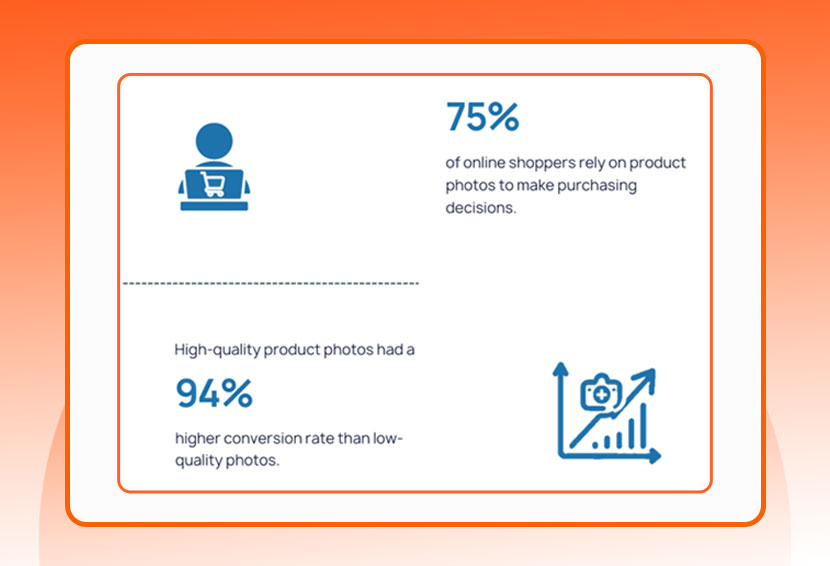
High-quality product photos are one of the most powerful drivers of sales in e-commerce, because no buyer wants to see blurred and grainy images. They need high-quality images that show your product from multiple angles to make a buying decision. That’s why high-quality product photos increase CTR by building trust and grabbing attention. Here are key statistics that show why product photos boost sales:
- High-Quality Images Build Shopper Trust: According to BusinessDasher, 75% of online shoppers rely on product photos when making a purchasing decision. Clear, accurate, and well-lit product photography reassures shoppers that what they see online is what they will get, reducing uncertainty and increasing purchase intent.
- High-Quality Listing Images Generate More Views: High-quality listing images generate dramatically more interest. According to BornSocial, these listings receive 94% more views compared to those with low-quality visuals. Better images help your product stand out, bringing more eyeballs and increasing traffic.
- Professional Photos Increase Conversion Rates: VisualChaos Studios reports that products using professional product images have a 33% higher conversion rate than those with lower-quality images. High-quality product photos reduce confusion, highlight important features, and help shoppers feel confident in buying, which in turn drives more sales.
- High-resolution Images Increase CTR: High-resolution, zoomable product photos make a real difference. According to Shopify, adding high-resolution images can increase conversion rate by 30%, because shoppers can inspect textures, details, and angles more effectively.
- High-Quality Product Photography Reduces Return Rates: High-quality images help present the product accurately, which significantly reduces product returns. According to research, around 39% of online shoppers return products because they don’t look like the image.
High-quality product photography allows your product to compete more effectively, especially if you’re selling a common or commodity item. Using polished, high-quality images can differentiate your product, making customers more willing to choose you over other sellers and brands.
What Are the Best Practices to Boost Sales With Product Photos?
In e-commerce, shoppers rely almost entirely on visuals to judge quality, compare options, and decide whether a product is worth their money. Because of this, strong, clear, and persuasive product photos boost sales more effectively than almost any other page element. The following best practices will help you create visuals that build trust, reduce hesitation, and turn browsers into confident buyers.
1. Prioritize High-Quality Product Images
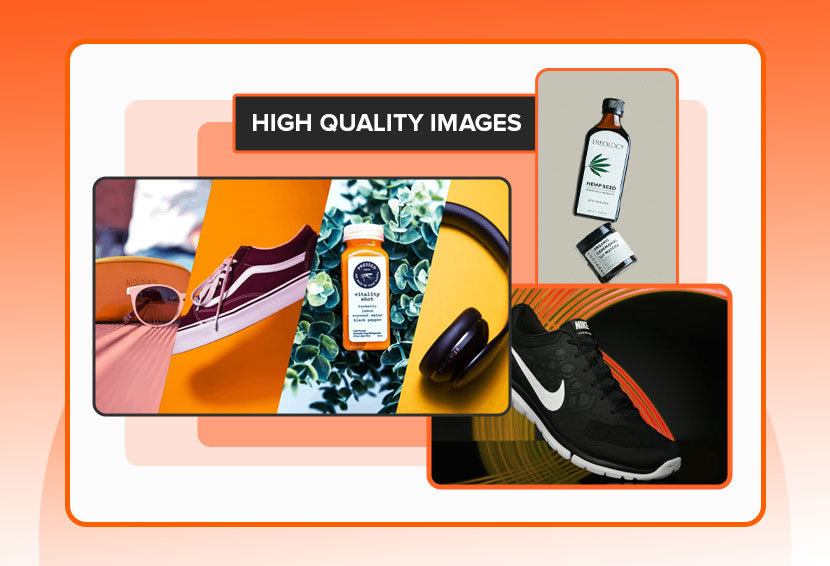
High-quality images are one of the strongest drivers of online conversions. When shoppers can clearly see texture, color accuracy, and fine details, they trust what they’re buying. Strong lighting, sharp focus, and accurate color representation instantly make your store feel more professional and reliable.
2. Show Multiple Angles & Detailed Shots
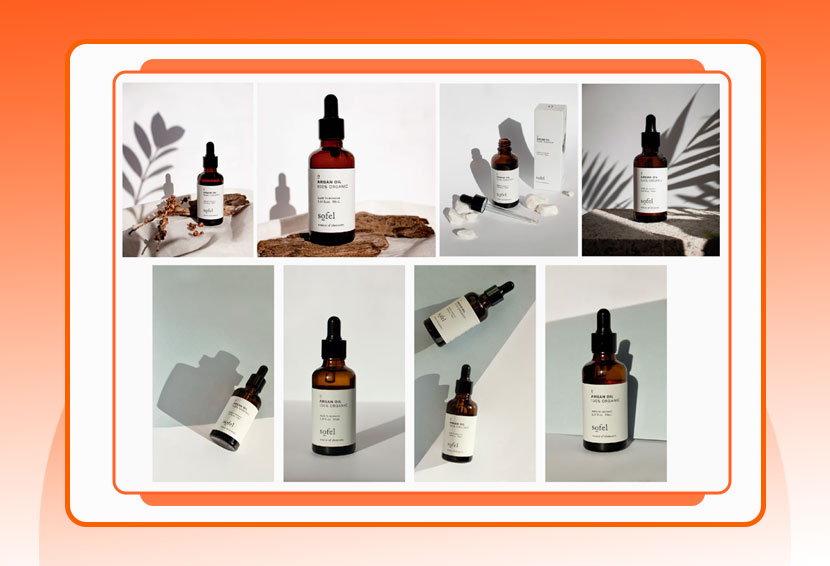
Customers want to examine a product from every angle, just as they would in a physical store. Providing front, side, back, top, and close-up views removes uncertainty and boosts confidence. When shoppers understand exactly what they’re getting, they are far more likely to move forward with the purchase.
3. Use Lifestyle Photography for Context
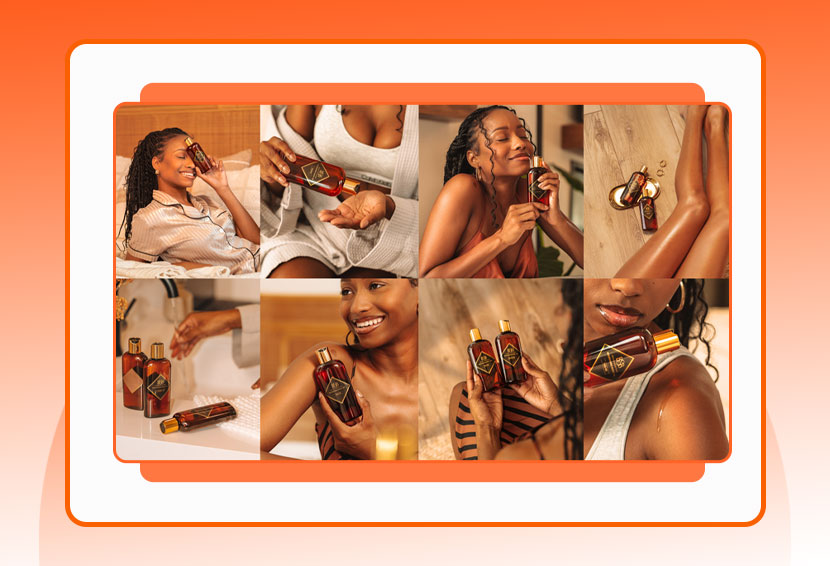
Lifestyle images show your product in real-life scenarios, helping shoppers imagine how they would use it. This type of product photography is especially effective for apparel, home goods, accessories, beauty items, and outdoor gear. By placing the item in a relatable setting, you turn the product into part of a story, and stories sell.
4. Enable High-Resolution Zoom Features
The ability to zoom in on high-quality product photography is essential, especially for items where material, stitching, patterns, or fine details influence buying decisions. Zoom functionality simulates an in-store experience, allowing shoppers to inspect the product closely before committing.
5. Skip Generic Stock Photos
Stock images often look staged and disconnected from the actual shopping experience. They can damage credibility and create doubt about the product’s authenticity. Instead, use real, custom product photography tailored to your brand. Authenticity always wins, and shoppers want to see your actual product, not a generic representation.
6. Tailor Visuals to Your Target Audience
Every audience has its own expectations. Understanding your audience’s preferences helps you choose the right lighting style, background, color palette, and aesthetic. When your product photography matches your buyer’s taste, your product photos boost sales because shoppers immediately feel, “This is for me.”
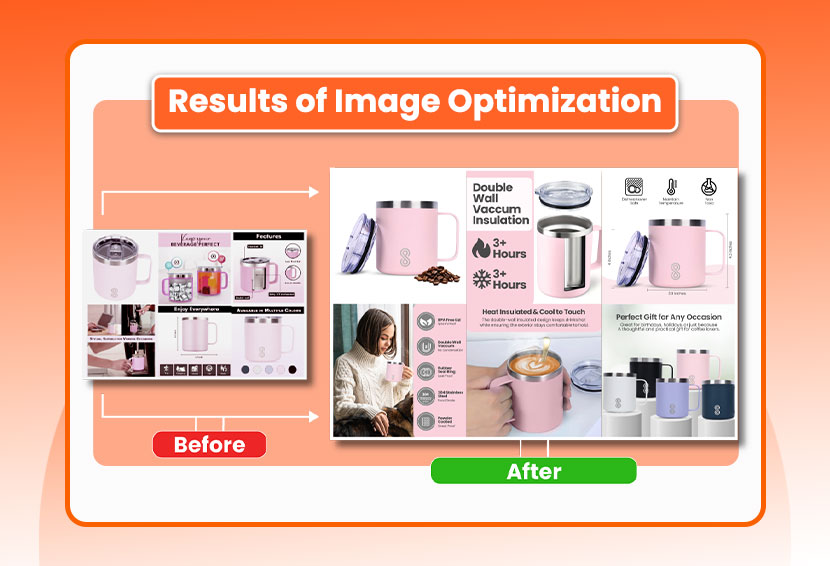
7. Use Infographic-Style Feature Highlights
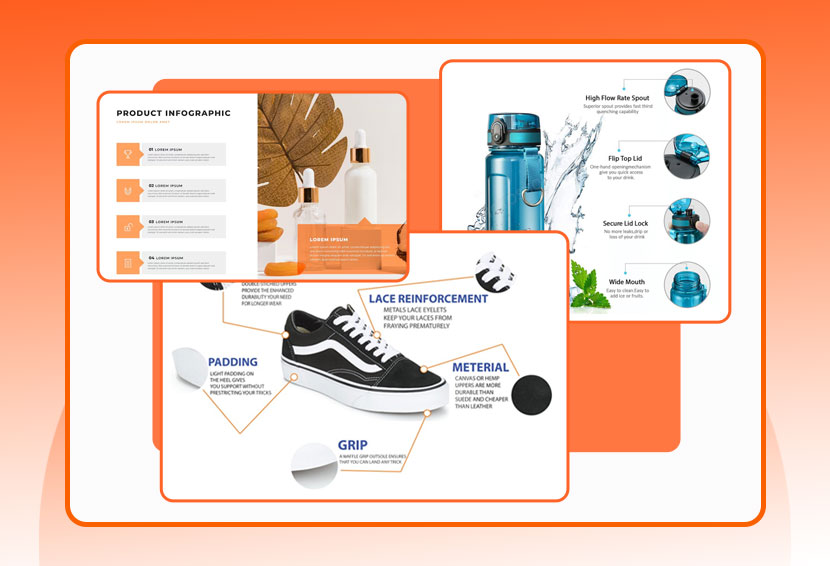
Infographic product photos combine clear visuals with key product information such as dimensions, features, materials, or usage instructions. This helps simplify complex products and speeds up decision-making. Customers love visuals that explain everything at a glance. When used strategically, these enhanced product photos boost sales by making essential details easier to understand.
8. Showcase Product Packaging Clearly
Packaging shots show exactly what customers will receive and how it will arrive. This builds trust, sets accurate expectations, and creates a premium feel. For gift items, packaging photography can even influence buying decisions. When shoppers know the unboxing experience is appealing, your product photos boost sales by enhancing perceived value.
9. Display Bundles & Sets Together
Group or bundle product photography shows how multiple items complement each other. This works well for skincare sets, kitchen kits, apparel collections, and tech accessories. When products appear together in one image, the value of buying the set becomes instantly clear. These bundle-focused product photos boost sales by increasing average order value and helping buyers see the benefit of purchasing more than one item.
10. Incorporate Authentic UGC Images
User-generated content builds trust and social proof like nothing else. Seeing the product in real homes, on real people, or used in real situations reassures buyers. This raw authenticity complements polished product photography and strengthens credibility. UGC product photos boost sales because they reflect genuine experiences rather than staged marketing shots.
11. Maintain Consistent Visual Branding
Consistency in lighting, editing, background, and styling helps you look polished and trustworthy. A cohesive visual identity makes your store feel high-end and reliable, encouraging shoppers to stay longer and explore more. When your product photography maintains a unified style, your product photos boost sales by reinforcing brand recognition and professionalism.
12. Optimize Images for Better SEO
Search engines rely on alt tags, descriptive filenames, and fast-loading image sizes to understand your content. Optimized product photography can increase your visibility in Google Images and product-rich results. The more visibility you gain, the more traffic flows to your site, helping your product photos boost sales even before buyers land on the product page.
13. Use Professional Editing for Polished Results
Professional image editing is important for marketplace products to correct color issues, align compositions, enhance backgrounds, and remove imperfections. Clean, well-edited images strengthen brand perception and highlight product quality. When editing is done correctly, your product photography looks more premium, and polished product photos boost sales by making your products appear more desirable and trustworthy.
14. A/B Test Your Product Photography Strategy
You should continuously test how your product photos are working in real life. For example, try A/B testing how many images you show per product page, maybe fewer but high-quality photos convert better, or maybe shoppers prefer more angles. You can also test which angles perform best, or even survey customers about what views they want to see.
Also Read: What is A+ Content? Understanding Its Impact on Your Amazon Listings
What Types of E-Commerce Product Photos Can I Use to Boost Sales?
There are various types of product photos, from lifestyle shots to 360-degree images, to increase sales and conversions. Each type of product photo uniquely presents your product and affects buyers’ decisions. You can include multiple types of images for a single product for a comprehensive visual display of your product.
1. Lifestyle Images
High-quality images in a lifestyle setting help tell a richer story. Instead of placing the item on a plain background, this style of product photography shows the product in real-life environments your customers recognize. When you combine strong visuals with thoughtful product photo editing, these photos don’t just display an item but sell a feeling or a lifestyle. In e-commerce product photography, lifestyle images play a major role in helping shoppers imagine how the product fits into their own daily lives.
2. Texture Detail Images
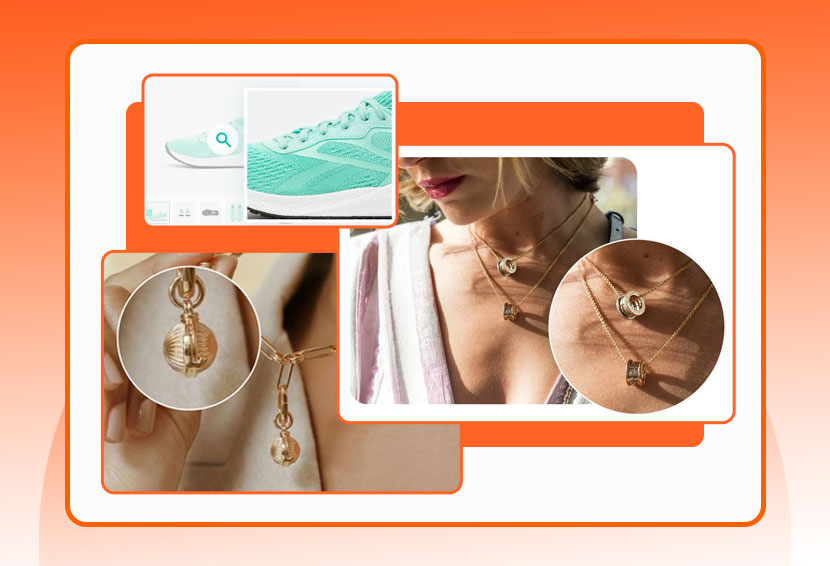
Texture detail images are extreme close-ups that highlight fabrics, materials, finishes, or intricate craftsmanship. With precise product photo editing, these shots help customers “feel” the product visually. This level of detail is especially valuable when shoppers can’t touch the item, allowing them to assess quality and authenticity before buying.
3. Size & Proportion Images
One of the biggest challenges in product photography is showing scale. Size and proportion images place the product next to a familiar object, held in someone’s hand, or inside a typical environment, so customers instantly understand its real dimensions. These high-quality images reduce confusion and help shoppers decide whether the item is the right fit. E-commerce product photo editing services can help you enhance clarity, ensuring the scale is shown accurately.
4. 360-Degree Product Photos
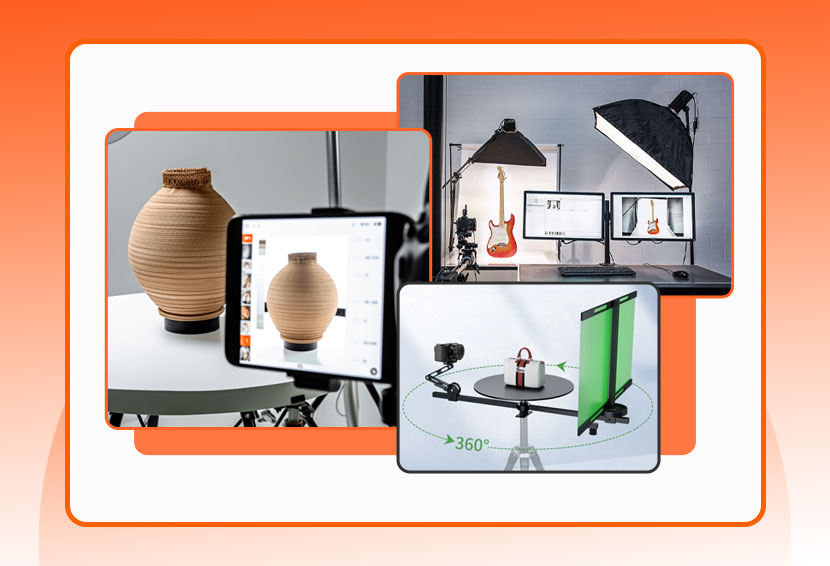
These interactive product photos allow customers to view an item from every angle, replicating the hands-on experience of shopping in-store. A 360-degree product view is created by capturing multiple still shots as the product rotates. This style of e-commerce product photography builds trust because shoppers can inspect every detail. High-quality images and careful product photo editing are essential to keeping each frame consistent and smooth.
5. Infographic Images
Infographic-style product photos mix visuals with text, icons, or arrows to highlight features, measurements, and technical details. This type of product photography is especially helpful for items with multiple functions or specifications. Infographics turn complex information into clear, high-quality images, improving the shopping experience and reducing customer confusion.
6. Process Shots
Process shots, also known as behind-the-scenes product photos, reveal how your product is made. They highlight the craftsmanship, quality, and care behind each item. These images add depth to your product photography and help customers connect emotionally with your brand. For handmade or specialty goods, process shots are extremely valuable in conveying authenticity.
7. Packaging Shots
Packaging shots show exactly how the product arrives: the box, wrapping, inserts, or branding elements. These high-quality images help set expectations and build trust by showing customers what they will receive. In e-commerce product photography, packaging shots also highlight your brand identity and attention to detail, making the unboxing experience part of the selling point.
8. Group / Bundle Shots
Group or bundle product photos display multiple items together, whether they are variants, sets, or complementary products. This type of product photography is great for bundles, collections, and cross-selling strategies. High-quality images help customers understand how the items relate to each other, increasing interest and perceived value. E-commerce product photo editing services can help ensure color, light, and spacing are consistent across all items in the group.
How to Optimize E-Commerce Product Photos for Image SEO and Website Performance?
Besides improving the aesthetic and marketing appeal of the product photos to boost sales, there are several important technical aspects you need to consider. Things such as image size, format, alt text, image site map, and structured data improve the performance of your website for user experience and SEO.
1. Use Clear, Descriptive File Names
When you name your image files, don’t rely on default camera names like IMG_1234.jpg. Instead, pick concise names that clearly describe what the image shows, for example, red-leather-jacket-front.jpg or 2025-stainless-water-bottle-16oz.jpg. This helps with SEO because search engines can understand what the image is about. It also makes it easier for you to manage and find the right product photos later.
2. Write Appropriate Alt Text
Alt attributes (or “alt text”) are important for both accessibility and SEO. For each product photo, write alt text that describes the image in plain language, such as “2025 red leather jacket with silver zipper.” If your products have model numbers or other identifying details, you can include them, but avoid keyword stuffing. Also, skip adding alt text to images that are purely decorative focus on meaningful product photography.
Also, when you have different angles, make sure each image has its own alt attribute that accurately describes what’s in the shot (for example, “back of red leather jacket with shoulder seam”). This helps shoppers feel more confident in what they’re buying and improves the SEO for each image.
3. Resize Images Smartly
To balance quality and performance, resize your product photos appropriately. For high-resolution and retina displays, upload large enough images so they don’t look blurry, but don’t make them unnecessarily huge. Overly large files slow down load times, while too small files hurt visual clarity, especially for key points of purchase.
4. Pick the Best File Format
Choosing the right format makes a big difference in load speed and image quality. For most product photos, JPEG is a solid choice because it gives a good quality-to-size ratio. Use PNG only when you need transparency or crisp graphics, like logos or icons. For other use cases, consider modern formats like WebP or AVIF, which can deliver smaller file sizes with minimal quality loss, but be careful, as some search engines and browsers do not support these WebP and AVIF formats. If you have vector graphics (such as logos), SVG works great because it scales cleanly.
5. Create and Use an Image Sitemap
If your store has a lot of images, especially if they’re in JavaScript galleries, popups, or sliders, make sure to include them in an image sitemap. Search engines often miss images that aren’t explicitly listed, so using an image sitemap helps ensure they are found and indexed.
6. Design for High-Density (Retina) Screens
Many users browse on devices with high-resolution or “retina” displays, so make sure your product photos look sharp on these screens. That means using images with sufficient pixel density so they don’t appear blurry on high-end devices. Still, try to keep file sizes under control; you don’t want to slow down your site just to support high-resolution images.
7. Use Lazy Loading Wisely
Lazy loading delays the loading of off-screen images (i.e., “below the fold”) until the user scrolls to them. This can significantly improve your site’s initial load time. But avoid lazy loading for the most important images, like your main product shot or the hero image, because you want them to appear as soon as the page loads and support a good first impression and faster Largest Contentful Paint (LCP).
8. Include Structured Data for Google Rich Results

Adding structured data to your pages can help Google show your product images in rich results, including special badges in Google Images. These badges give shoppers quick details about your page, which can attract more targeted traffic and improve how your product photography performs in search.
To make this work, you need to follow Google’s general structured data guidelines as well as the rules for the specific type of structured data you use.
Optimize Your Product Photos With $5 Image Optimization Offer
Great visuals don’t happen by accident, they require planning, skill, and careful refinement. That’s why consistent editing, optimization, and quality control are essential for every listing. Professional solutions like SPCTek’s $5 Image Optimization make it easier for sellers to meet marketplace standards without spending a fortune.
Because image editing is important for marketplace products, even small improvements can increase clarity, trust, and conversions. By investing in reliable e-commerce product photo editing, you ensure that every product looks its best, communicates value instantly, and wins more buyers in an increasingly competitive online market.