
Too busy to read? Listen to this article instead.
Performance Max (PMax) now drives a significant portion of all Google Ads conversions, and if you’re not running it in 2026, you’re leaving serious money on the table. In a landscape where attention is fragmented across Search, YouTube, Display, Gmail, Discover, and Maps, manually managing a separate campaign for each channel is no longer practical. Google Performance Max was built to solve exactly that problem: one campaign, every surface, fully AI-driven.
This PMax campaigns guide covers everything you need what the campaign type actually is, how the optimization engine works, what your setup should look like, and which strategies separate accounts that scale from accounts that plateau. Whether you’re running PMax for the first time or troubleshooting a campaign that’s already live, by the end of this guide, you’ll have a clear picture of what to do and why it works.
What Is a Performance Max (PMax) Campaign?
A Performance Max campaign, commonly called a PMax campaign, is a single, goal-based campaign type that runs your ads across every Google channel simultaneously: Search, YouTube, Display, Gmail, Discover, and Maps. Instead of manually managing separate campaigns for each placement, you upload your creative assets, define your conversion goals, and let Google’s AI handle the rest.
Introduced in 2022, PMax replaced Smart Shopping and Local campaigns entirely. Today, over 1 million advertisers use it globally, making it one of the most widely adopted formats in Google Ads history.
PMax Campaign vs a Traditional Campaign
The core difference is control vs. automation. Traditional Search campaigns give you precise keyword-level control, so you decide which search terms trigger your ads, what bids to set, and where to send users. PMax campaigns hand those decisions to Google’s AI, which reads real-time intent signals and determines the best format, placement, and audience for every impression.
This doesn’t make Search obsolete. PMax and Search campaigns are designed to complement each other. PMax casts the wide net while Search captures high-intent, exact-match traffic. Running both together is the standard approach in 2026.
How Does the Performance Max Campaign Work?
Google Performance Max runs a continuous improvement loop across five elements simultaneously: bidding, creative combinations, audience targeting, ad formats per placement, and landing page matching via Final URL Expansion. Every auction, the AI is adjusting all five in real time, not sequentially, not manually. Here’s exactly how that process unfolds.
The optimization loop runs in four stages:
- Asset input: You provide headlines, descriptions, images, logos, and videos organized into asset groups.
- Real-time signal reading: Google’s AI analyzes search queries, browsing behavior, location, device, time of day, and audience intent signals simultaneously.
- Dynamic ad assembly: The system selects the best combination of your assets for each placement and user.
- Cross-channel attribution and bid adjustment: Conversion data flows back into the model, and Smart Bidding automatically adjusts bids in real time across all channels.
Asset groups are the building blocks of every PMax campaign. Each asset group contains the creative materials tied to a specific product theme or audience. Audience signals, lists, interests, or customer data you provide guide the algorithm toward the right users faster without limiting who it can actually reach.
What Do PMax Ad Examples Look Like?
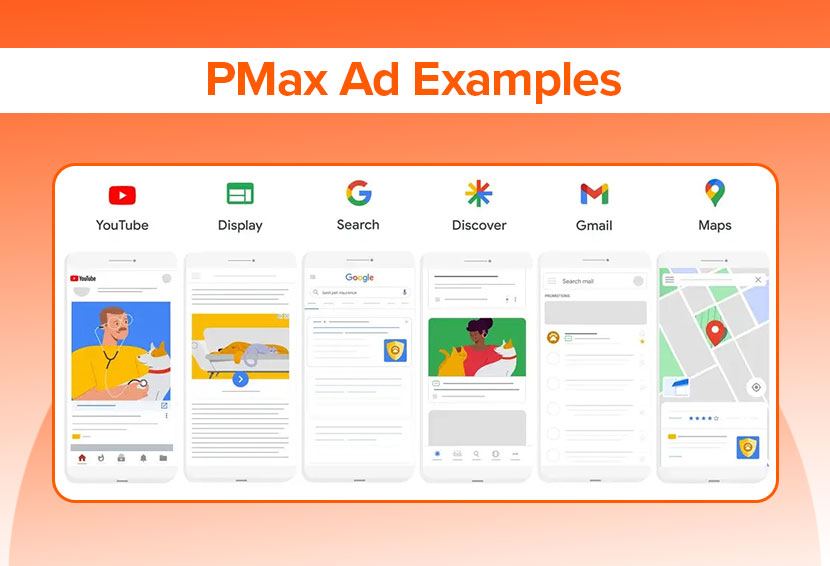
One of the most confusing things about PMax for new advertisers is that there’s no single “PMax ad format.” The ad looks completely different depending on where it shows up. The same campaign, the same assets, produce six different ad types across six different placements. Here’s what that actually looks like:
Search:
A regular text ad headline, URL, and a short description show up at the top of Google search results. The difference from a standard Search campaign is that PMax doesn’t need keywords to trigger these. It uses search themes to figure out which queries are relevant.
YouTube:
A video ad that plays before or during YouTube content. It can be skippable after 5 seconds or a short 6-second bumper. PMax pulls from whatever video you uploaded, which is exactly why uploading your own video matters so much. The auto-generated version Google creates from your images almost never performs as well.
Display:
A banner-style ad that appears across websites and apps in Google’s network. Google takes your images and headlines and assembles them into whatever size fits the available ad space automatically.
Discover:
A card-style ad inside the Google Discover feed on mobile, the content feed that appears on Android phones and in the Google app before someone even searches for anything. These look like organic content in the feed, not like traditional ads. A strong image and a short headline do most of the work here.
Gmail:
An ad that sits in the Promotions or Social tab of someone’s inbox, looking like a regular email. It has a subject line and a short preview and only expands into a full ad when the person clicks to open it. The subject line is what determines whether anyone sees the rest of it.
Maps:
An ad that appears when someone nearby searches for a business type related to yours, showing up as a promoted pin or a top listing in Google Maps. These are especially powerful for local businesses since they reach people who are already looking for somewhere to go.
The reason studying real PMax ad examples matters is simple: if your asset group is missing images in a certain format or has no video, PMax skips those placements entirely. A gap in your creative means a gap in your reach across a whole channel at once.
What Are the Main Benefits of Using Performance Max Over Traditional Campaigns?
PMax campaigns run across every Google channel from a single setup, with AI handling bids, placements, and creatives in real time. It finds your audience, tracks the full customer journey, and gets measurably better with scale. 2024 updates delivered 10%+ more conversions globally without any manual input.
- One campaign, every Google channel: A single setup covers Search, YouTube, Display, Gmail, Discover, and Maps, eliminating the operational overhead of managing separate campaigns.
- AI does the heavy lifting: Bids, placements, creative combinations, and CTAs are automatically adjusted in real time based on performance data.
- Broader audience reach: The algorithm finds users actively searching for your products and lookalike audiences who haven’t discovered you yet.
- Data-driven attribution tracks the full customer journey across all touchpoints, not just the last click.
- Faster scaling: Less manual management means more time for strategy; the model improves with every conversion it records.
- Proven 2024 results: Updates to the PMax system delivered 10%+ more conversions automatically across campaigns globally.
What Are the Best Practices for Setting Up a Successful Performance Max Campaign?
Start with Google Ads Conversion Tracking, launch on Maximize Conversions for 2 – 4 weeks before adding a ROAS target, and build themed asset groups with every slot filled and a custom video uploaded. Add audience signals, search themes, and brand exclusions from day one.
- Get conversion tracking right first: Use Google Ads Conversion Tracking (not just GA4 imports). The AI is only as good as the signal it receives; poor conversion data produces poor results.
- Start with Maximize Conversions (no ROAS target): Let the algorithm learn for 2-4 weeks before adding constraints. Adding a Target ROAS too early starves the system of data.
- Build themed asset groups: Organize by product theme or category, not one large catch-all group. Tighter themes help the AI match the right creative to the right query.
- Upload the maximum number of assets: Fill every slot. More variety gives the system more combinations to test and optimize.
- Always upload a custom video: A custom video consistently outperforms Google’s auto-generated slideshows. If you don’t provide one, Google will create one from your images, and it won’t be as effective.
- Use audience signals, not restrictions: Signals guide the algorithm toward high-value users; they don’t cap your reach or exclude anyone.
- Add search themes: In 2026, you can add up to 50 search themes per asset group. They function like broad match keyword guidance, telling the AI which queries are most relevant.
- Set brand exclusions: Prevents PMax campaigns from cannibalizing your branded Search campaigns and inflating conversion counts with traffic you’d have captured anyway.
Are There Specific Strategies to Enhance Performance Max Campaign Results?
Swap out Low-rated assets regularly, use the Insights tab to track what’s driving conversions, and introduce a Target ROAS only after 30-50 monthly conversions. Refresh creative monthly, run PMax experiments, and use brand exclusions to protect your Search campaigns.
- Review asset performance labels: Assets are rated Best, Good, or Low. Replace Low-rated assets regularly; always swap, never just remove.
- Monitor the Insights tab: This shows which audiences, search themes, and creative combinations are actually driving conversions essential for adjusting campaigns based on performance.
- Layer in a Target ROAS carefully: Once you hit 30–50 conversions per month, introduce a Target ROAS within 20% of your actual ROAS. Aggressive targets applied too early will limit reach.
- Rotate creative regularly: A monthly refresh prevents creative decay. Don’t overhaul everything at once; swap out the lowest performers first.
- Run PMax experiments: Test asset variations and bidding changes with a controlled traffic split so you can isolate what’s actually driving improvement.
- Protect Search campaigns from cannibalization: Brand exclusions and account-level negative keywords keep PMax from absorbing traffic your dedicated Search campaigns should be winning.
How Does Performance Max Optimize My Google Ads Campaigns?
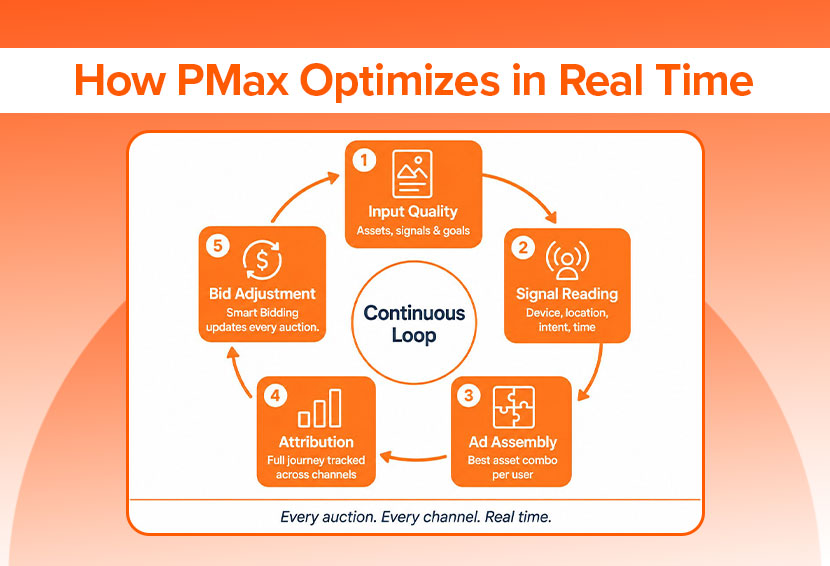
Google Performance Max runs a continuous improvement loop. Here’s how it works step by step.
Step 1: Input Quality Determines the Ceiling
The optimization process starts with what you give it. High-quality assets, accurate conversion tracking, and strong audience signals set the upper limit of what the algorithm can achieve. A campaign with weak creatives, misconfigured conversion actions, or no audience signals will optimize just toward the wrong things. Think of your inputs as the brief you hand the AI; the more precise and complete it is, the better the output.
Step 2: Real-Time Signal Reading
For every potential impression, the AI processes hundreds of signals simultaneously, searching query, device, browsing history, location, time of day, and audience membership in milliseconds. This is what separates PMax from any manual campaign structure. No human bidding system can evaluate that many variables at that speed, at that scale, across six channels at once.
Step 3: Dynamic Ad Assembly
The system pulls from your asset groups and assembles the highest-scoring creative combination for that specific user and placement in real time. A headline that performs well on Search may be paired with a completely different image on Discover for the same campaign. The more assets you upload, the more combinations the system can test, which is exactly why filling every asset slot matters.
Step 4: Cross-Channel Attribution
Conversion data flows back from every channel into a unified attribution model. A user who sees a YouTube ad, clicks a Display ad, and converts via Search is tracked as a single journey, not three isolated events. This cross-channel visibility is what allows Google Performance Max to make smarter bidding decisions than any single-channel campaign ever could, because it understands the full path to conversion, not just the last touch.
Step 5: Continuous Bid Adjustment
Smart Bidding updates bids based on this attribution data before every auction. The model compounds every conversion it records, making the next prediction sharper. This is why the first 2–4 weeks feel slow; the algorithm is building the foundation it needs to accelerate. Disrupting that period with frequent changes resets the learning and costs you the momentum the system has already built.
Important: Allow at least 2 weeks before evaluating performance, and limit major campaign changes to once every two weeks. Frequent changes reset the learning period and slow down optimization.
Can I Customize Performance Max Campaigns for Specific Goals?
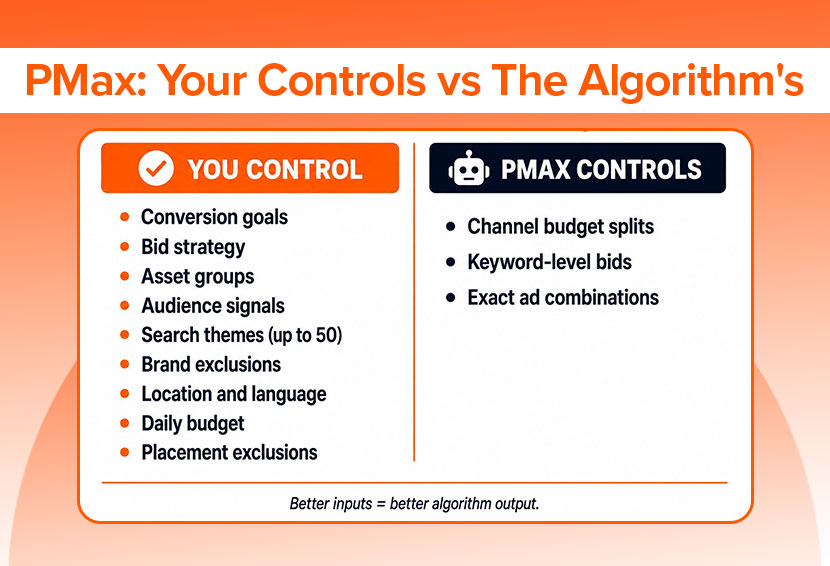
You control conversion goals, bid strategy, asset groups, audience signals, search themes, brand exclusions, location, budget, and placement exclusions. What you can’t control is how budget splits across individual channels, keyword-level bids, or exact ad combinations; those are handled by the AI dynamically.
What You CAN Control:
- Conversion goals and what actions count as conversions
- Bid strategy (Maximize Conversions or Target ROAS/CPA)
- Asset groups and the creative within them
- Audience signals to guide targeting
- Search themes (up to 50 per asset group in 2026)
- Brand exclusions at the campaign or account level
- Location and language targeting
- Daily budget
- Placement exclusions (content categories and specific URLs)
What You CANNOT Control:
- How the budget is split across individual channels (Search, YouTube, Display, etc.)
- Bids at the keyword level
- Exact ad combinations the AI assembles those dynamically
What Are the PMax Image Requirements and Sizes?
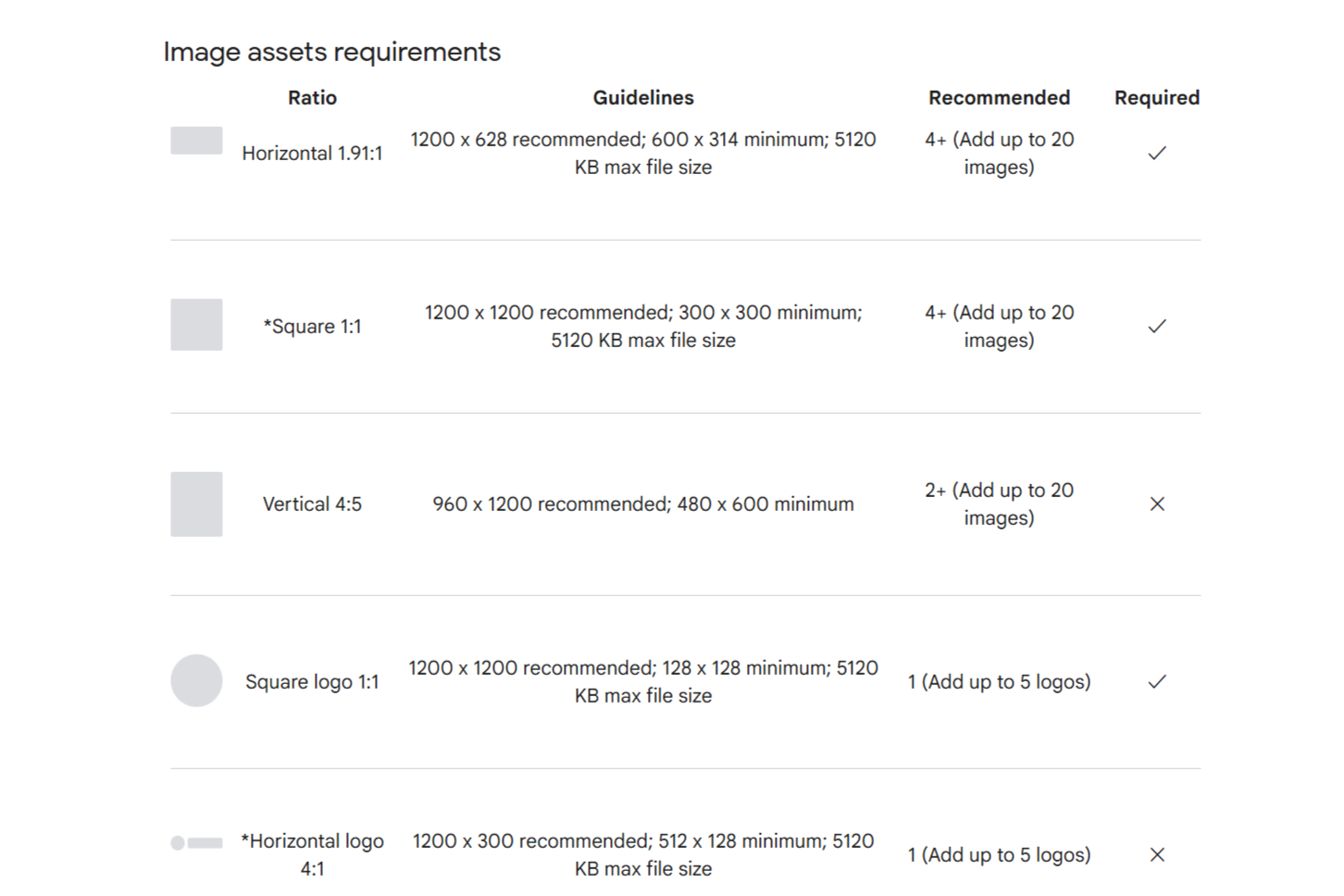
PMax needs creative assets in specific formats to serve across every Google placement. Below are the current PMax image requirements and PMax sizes for 2026.
- Landscape image (1.91:1): 1200×628px minimum, max 5MB, JPG or PNG used across Display, Gmail, and Discover
- Square image (1:1): 1200×1200px minimum essential for Display and Gmail placements
- Portrait image (4:5): 960×1200px critical for mobile placements like Discover and YouTube Shorts
- Square logo (1:1): 128×128px minimum; transparent PNG strongly recommended
- Landscape logo (4:1): 512×128px minimum
- Videos: Must be hosted on YouTube, minimum 10 seconds; provide 16:9, 1:1, and 9:16 ratios for full placement coverage
- Text: Up to 15 headlines (30 characters each), 5 descriptions (90 characters each), 1 long headline (90 characters), and 1 business name (25 characters)
Uploading assets in all three image aspect ratios, landscape, square, and portrait, ensures your ads are eligible for every placement. Missing the portrait format, in particular, will limit your reach on mobile-heavy surfaces.
Conclusion
Performance Max is no longer optional for serious Google advertisers. It’s the campaign type that handles scale, automation, and cross-channel reach in ways no single traditional campaign can replicate. The trade-off is that results are only as good as what you put in. Clean conversion data, well-organized asset groups, and a proper setup routine are the difference between a PMax campaign that performs and one that just spends.
Start with the fundamentals: get conversion tracking right, give the algorithm a proper learning window, and build from there. Once the data is flowing, the optimization levers covered in this guide, asset rotation, ROAS layering, experiments, and cannibalization controls, are what separate accounts that scale from accounts that plateau.