
Roughly 70 percent of online shopping carts are abandoned, according to a meta-analysis by the Baymard Institute. For a store doing $300,000 a month, that is not a rounding error. It is the single largest pool of recoverable revenue in the business, sitting with people who already picked a product, already entered a cart, and already signaled they wanted to buy.
Most brands set up abandoned cart emails, see it generate revenue, and never touch it again. That is where the money leaks. A cart flow built without attention to timing, offer strategy, deliverability, or compliance can underperform badly, train shoppers to wait for discounts, or in the worst case put your entire sending domain at risk.
This guide explains why shoppers abandon carts, whether these emails count as transactional or marketing under the law, when to send each message in the sequence, what the best examples do differently, which templates to copy, and how to tell whether your flow is actually earning its keep.
What Are Abandoned Cart Emails?
An abandoned cart email is an automated message sent to a shopper who added items to their online cart and left without buying. It is triggered by behavior rather than scheduled, and it usually arrives within hours of the abandonment.
The value comes from intent. Someone who browsed a category page told you very little. Someone who added a specific product to a cart told you they wanted that product at that price. That is the strongest buying signal most ecommerce brands ever capture, and it is why cart flows typically outperform every other automated message in the account.
Three similar triggers get confused with each other, and treating them the same is a common mistake. They differ by how much intent the shopper has shown and how they should be messaged.
| Trigger | What happened | Intent level | How to message it |
|---|---|---|---|
| Browse abandonment | Viewed a product page, added nothing | Low | Soft product reminder, no urgency |
| Cart abandonment | Added to cart, left before checkout | Medium | Show the cart, remove the friction |
| Checkout abandonment | Started checkout, left before paying | High | Handle the specific blocker directly |
Each of these needs different copy and different timing. A checkout abandoner who already entered payment details does not need convincing that they want the product; they need whatever blocked the transaction removed. If you are building out automated flows more broadly, our guide to why email marketing matters for growing businesses covers how the cart flow fits with welcome, post-purchase, and winback sequences.
Why Do Shoppers Abandon Their Carts?
Shoppers abandon carts for five main reasons: they were not ready to buy, extra costs were higher than expected, checkout took too long, account creation was required, or they did not trust the site with payment details. Baymard Institute research sizes each one, and every reason calls for a different response in the recovery email.
1. They Were Never Ready to Buy
Nearly 42 percent of shoppers abandon because they are just browsing or not ready to purchase. This is the largest single group, and no discount will fix it. These shoppers need a gentle reminder and permission to come back later, not pressure.
2. Extra Costs Were Too High
Around 40 percent of abandoners walk away because shipping and other added costs push the total past what they expected. This is the most fixable reason on the list. A free shipping threshold, clearer cost disclosure earlier in the journey, or a one-time shipping offer in the recovery email all address it directly.
3. The Checkout Process Took Too Long
About 17 percent leave because checkout demanded too much from them or is too long. Express wallets like Apple Pay and Google Pay remove most of this friction, since they eliminate manual card entry entirely on mobile.
4. They Were Forced to Create an Account
Requiring account creation before purchase gives a hesitant shopper a reason to stop. Guest checkout should always be available. Accounts are worth offering, never worth demanding.
5. They Did Not Trust the Site With Payment Details
Missing security signals, an unfamiliar brand, or a checkout that looks dated all raise doubt at exactly the wrong moment. Visible trust badges, clear privacy information, and recognizable payment methods reduce this.
Diagnosing which of these dominates your store changes everything downstream. Heatmaps, checkout funnel analysis, and a one-question survey inside the cart flow will tell you more than any benchmark. Build the sequence around your actual blocker, not the generic one.
Are Abandoned Cart Emails Transactional or Marketing?
This question comes up constantly, and a surprising amount of published guidance gets it wrong. Some well-known email platforms state that cart reminders are transactional messages. Under US law, that is not correct, and acting on it creates real exposure.
The CAN-SPAM Act defines a narrow set of transactional or relationship messages that are exempt from most requirements. The category covers things like order confirmations, shipping updates, warranty information, and account notices. The common thread is a completed transaction or an existing obligation.
An abandoned cart is not a completed transaction. Nothing was purchased, no obligation exists, and the purpose of the message is to cause a sale. That makes it a commercial message, and the classification does not change because the email was triggered by behavior rather than sent as a campaign.
What That Means in Practice
Treating every cart email as commercial resolves the question permanently. Under CAN-SPAM, a commercial message requires:
- Accurate sender information and a subject line that reflects the content
- A clear way for the recipient to opt out, honored promptly
- A valid physical postal address for the sender
- Identification that the message is an advertisement
| Transactional message | Marketing message (includes cart emails) | |
|---|---|---|
| Examples | Order confirmation, shipping update, account notice | Abandoned cart, welcome offer, newsletter, winback |
| US legal basis | CAN-SPAM transactional or relationship exemption | CAN-SPAM commercial message rules |
| Unsubscribe link | Not required | Required |
| Physical postal address | Not required | Required |
| Advertisement identification | Not required | Required |
| Prior consent (US) | Not required | Not required under CAN-SPAM |
| Prior consent (Canada, EU) | Varies | Generally required |
Worth knowing that CAN-SPAM operates on an opt-out basis. It does not require prior consent before a commercial email is sent, which is why cart emails to shoppers who entered an address at checkout are not automatically a federal violation in the US.
Where the Rules Get Stricter
That permissiveness is specific to the United States. Canada’s CASL requires consent, either express or implied, before any commercial electronic message is sent at all. In the EU and UK, GDPR and the ePrivacy rules require a lawful basis for processing and generally expect consent for marketing email.
If you sell internationally, build the flow to the strictest standard that applies to your list rather than maintaining separate logic per region. It is simpler, and it removes the risk of a misrouted send.
One note before moving on. This is general information rather than legal advice, and penalties under CAN-SPAM are assessed per message rather than per campaign, which makes mistakes expensive at volume. Have counsel review your setup if you are operating across multiple jurisdictions.
When to Send an Abandoned Cart Email: Timing That Works
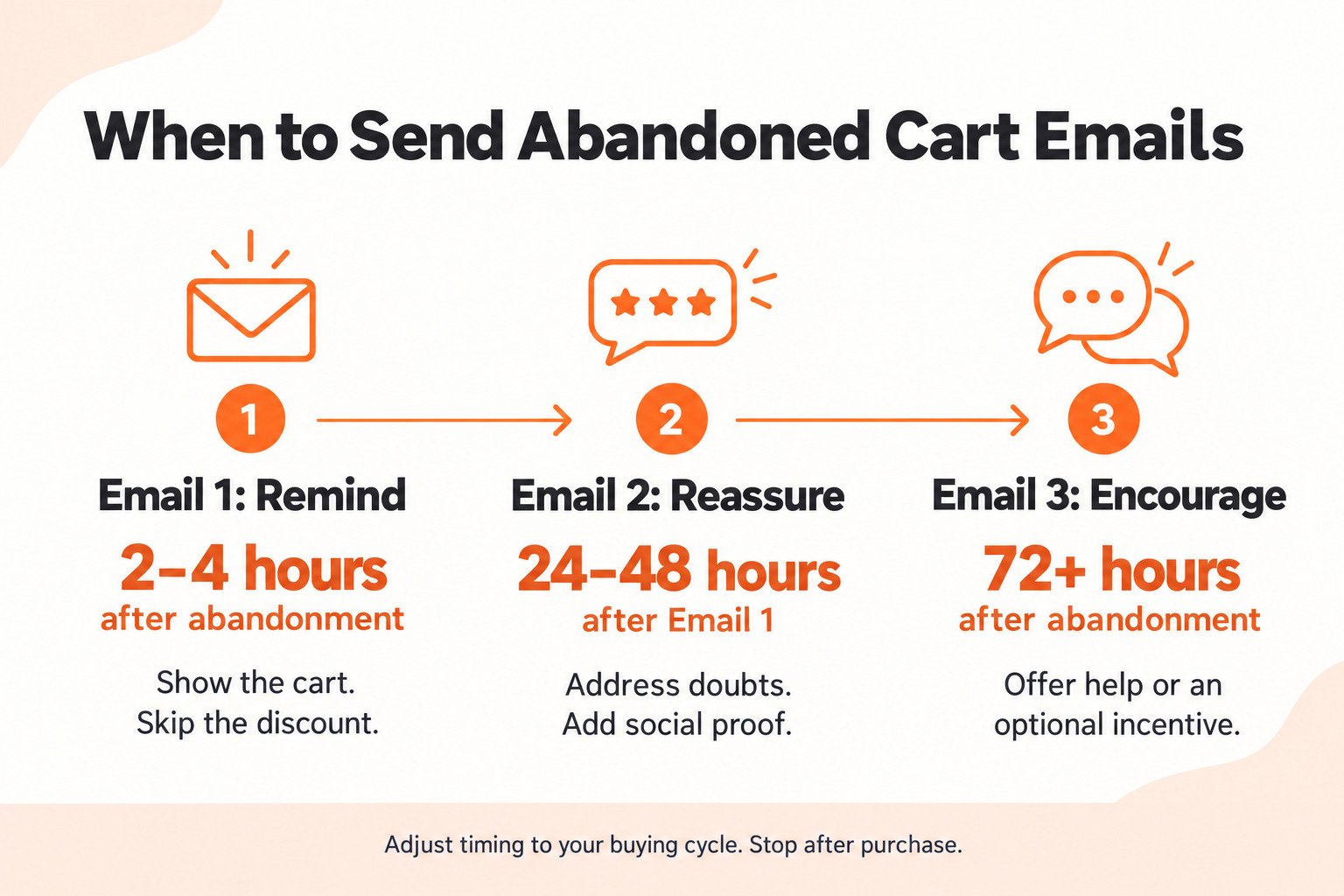
Timing does more work than copy in a cart sequence. Send too early, and you interrupt someone who is still deciding. Send too late, and they have bought elsewhere or forgotten the product entirely. Most effective sequences run two to three emails. Klaviyo recommends a first reminder 2 to 4 hours after abandonment and a second 24 to 48 hours after that, which matches what works across most categories.
1. The First Email: 2 to 4 Hours After Abandonment
Keep this one simple and friendly. Show the cart contents, include one clear call to action, and skip the discount entirely. A meaningful share of abandoners were simply interrupted, and a straightforward reminder converts them without costing you margin.
2. The Second Email: 24 to 48 Hours Later
By now, the reminder has not worked, which means something is blocking the purchase. This email should handle objections directly. Add social proof, address shipping or return policy concerns, answer the questions your support team hears most, and give them a reason to trust the purchase.
3. The Third Email: 72 Hours or Later
This is where an incentive belongs if you are going to use one. By three days out, most shoppers who were going to convert on their own already have. If you prefer not to discount, use this slot to recommend alternative products or simply close the loop politely.
After three messages, stop. Shoppers who have not responded have either purchased elsewhere or lost interest, and continuing to send generates complaints without generating revenue. Move them into your regular segmentation instead.
4. Adjust Timing to Your Purchase Cycle
These windows suit most consumer purchases. A $25 impulse item can move faster, sometimes with a first send inside an hour. A $2,000 considered purchase needs a longer runway, because the shopper is genuinely researching rather than forgetting. Match the sequence to how your customers actually decide.
What Makes a Good Abandoned Cart Email?
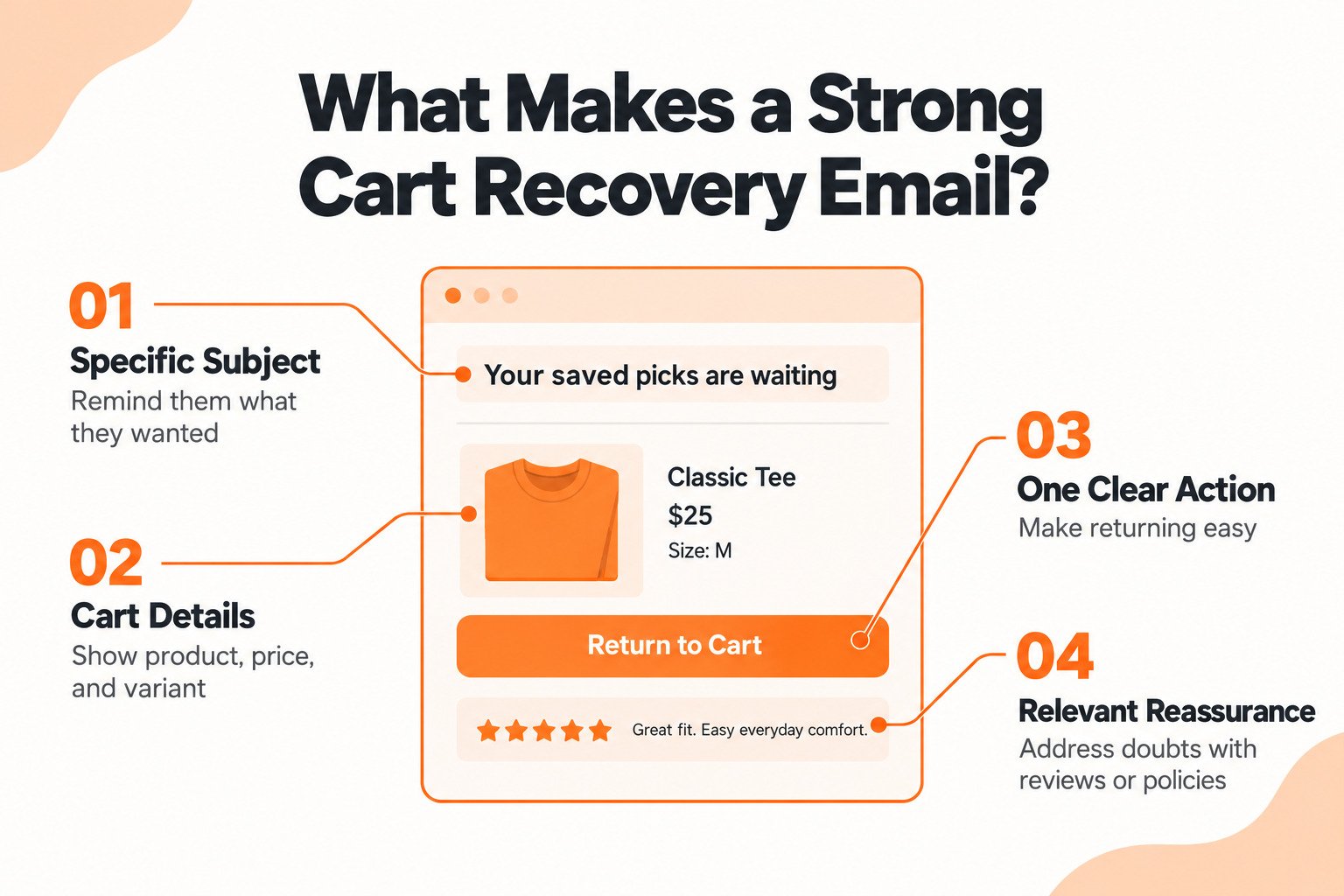
A good abandoned cart email names the specific product in the subject line, shows the cart contents with image and price, gives one clear call to action, and loads properly on a phone. Social proof and brand voice separate the strong ones from the forgettable ones. The components are well established, so execution on each is what decides performance.
1. A Subject Line That Names the Product
Generic subject lines like “You left something behind” compete with every other brand doing the same thing. Naming the actual product the shopper abandoned performs better because it is specific and it reminds them what they wanted. Personalization beyond the first name matters here.
2. The Actual Cart Contents
Show the product image, name, price, and any variant details like size or color. Dynamic product blocks handle this automatically in most platforms. A cart email that does not show the cart is asking the shopper to remember something they already forgot once.
3. One Clear Call to Action
One action, repeated if the email is long, never five competing links. The button should say what happens next in plain language. Return to cart, complete your order, and finish checking out all work. Design it to stand out against the rest of the email.
4. Social Proof Where It Fits
Reviews and ratings on the abandoned product address doubt directly, which is why they work best in the second email rather than the first. According to Klaviyo research, customer reviews are the most influential factor when someone makes an initial purchase with a brand. Our guide to leveraging customer reviews covers how to build the review volume that makes this possible.
5. Mobile-First Design
Most carts are built on phones, and most cart emails are opened on phones. Single-column layouts, buttons large enough to tap comfortably, and readable type without zooming are not refinements. They are the baseline.
6. A Simple Abandoned Cart Email Often Beats a Complex One
A simple abandoned cart email contains the product, the price, one button, and two lines of copy. Nothing else. For stores with small catalogs or limited design resources, this version frequently outperforms an elaborately designed template, because it loads fast, renders correctly everywhere, and reads like a note from a person rather than a campaign.
Strip it back to the essentials before adding anything. Start with the cart contents and a single call to action, measure it, then add social proof or objection handling only where the data shows a gap. Complexity should earn its place rather than arrive by default.
7. Brand Voice That Sounds Like You
Cart emails are one of the few automated messages where personality is welcome. The shopper already knows your brand. A message that sounds like a generic platform template wastes the familiarity you already earned.
Abandoned Cart Email Examples
The examples below are live cart emails from brands we work with, shared with permission. Two of them are complete sequences, which is more instructive than isolated screenshots because the value is in how each message differs from the one before it.
1. Sweet Face Minerals: Hold the Discount Until Last
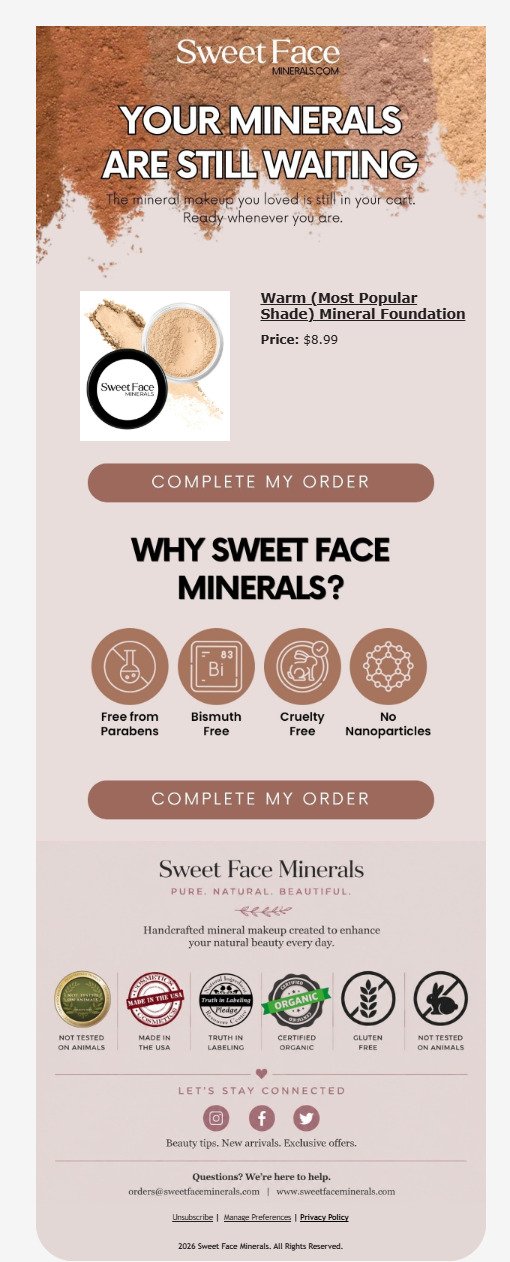
This mineral makeup brand runs the sequence the way the math supports. The first email carries no offer at all. It shows the abandoned product, states the price, and leans on brand reassurance through four certification icons covering parabens, bismuth, cruelty testing, and nanoparticles. Those address the exact doubts a first-time buyer of mineral cosmetics has.
The offer only appears later, and it arrives in a conversational format rather than a banner. A speech bubble reads “take 10% off your cart,” answered by a second bubble saying “yes, please!” The discount code is unique rather than generic, which means redemption is trackable per shopper, and the code cannot leak to coupon sites.
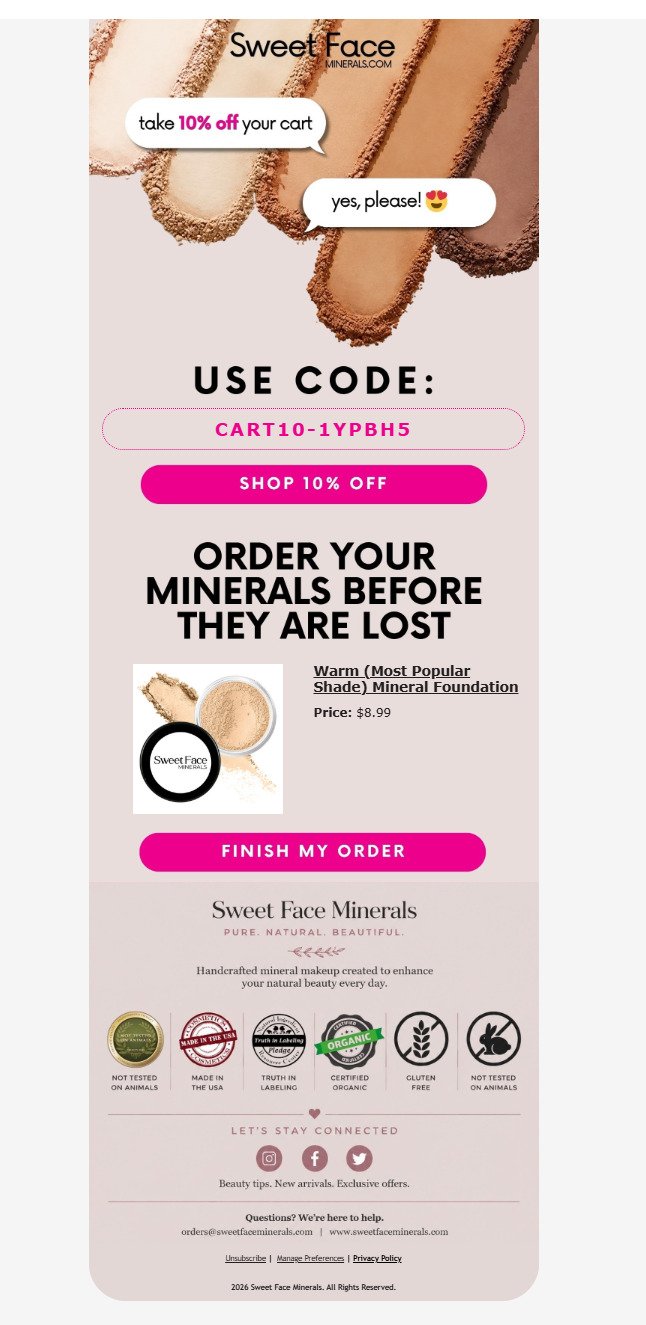
Steal this: run at least one full email before any incentive, and generate unique codes rather than a shared one. Every shopper who converts on the first email is margin you did not give away.
2. Earthrise Supply: The Same Cart, Rich and Simple
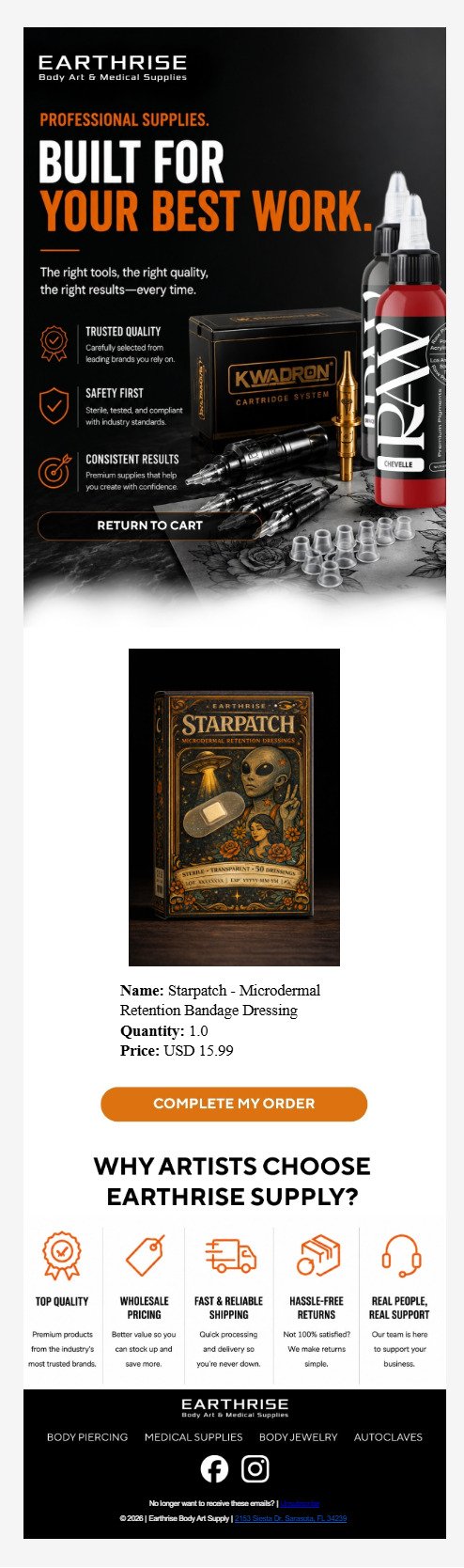
This B2B body art and medical supplier runs two versions of the same message, which is a useful comparison because the underlying cart is identical. The richer version opens with a full-bleed product banner and three trust pillars built for professional buyers: trusted quality, safety first, and consistent results. Those are the concerns of someone buying supplies they will use on clients, not themselves.
The simpler version strips the banner entirely and opens with a plain headline, the product, and the same five-benefit row covering quality, wholesale pricing, shipping, returns, and support. It loads faster, renders more predictably across clients, and takes a fraction of the production time.
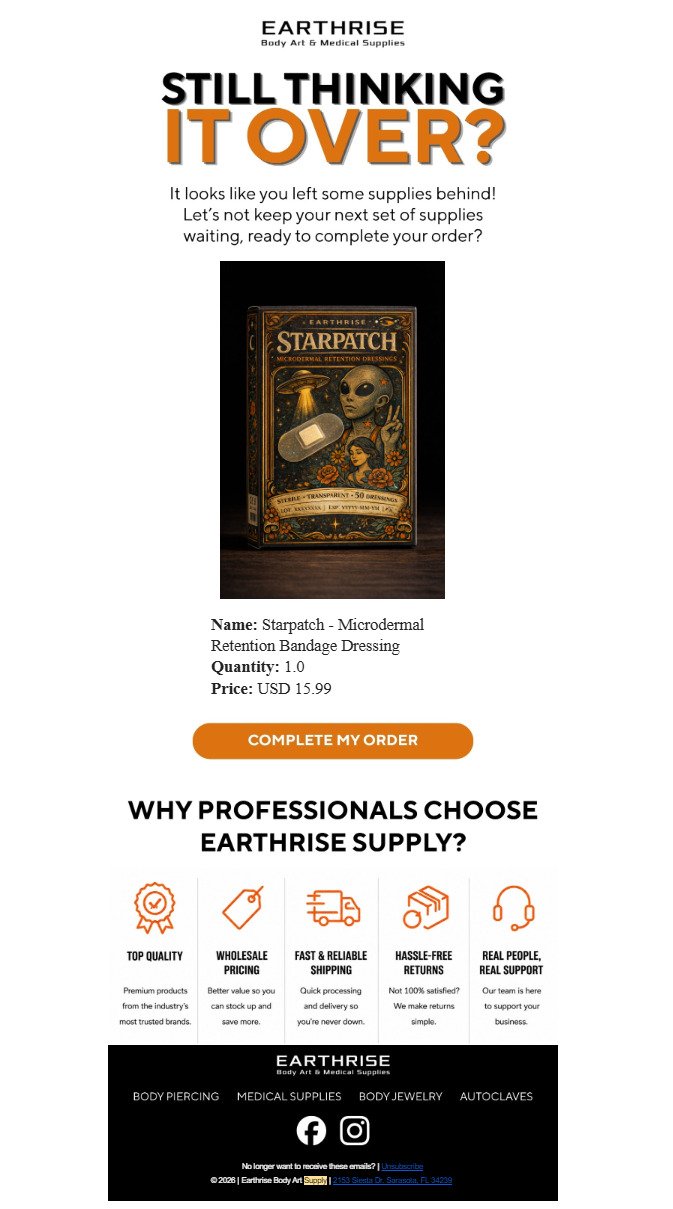
The five-benefit row does the work of a much longer email. Note also that the B2B framing changes with the audience, shifting from “why artists choose us” to “why professionals choose us” depending on who is receiving it.
3. SpeedBump: Objection Handling as a Dedicated Email
This spice dispenser brand splits the sequence by job. The first message handles the reminder and carries everything needed to close: the product block with name, quantity, and price, a benefits grid, a free shipping threshold at $50, a bestsellers row, and genuine customer reviews with photographs and verified purchase badges.
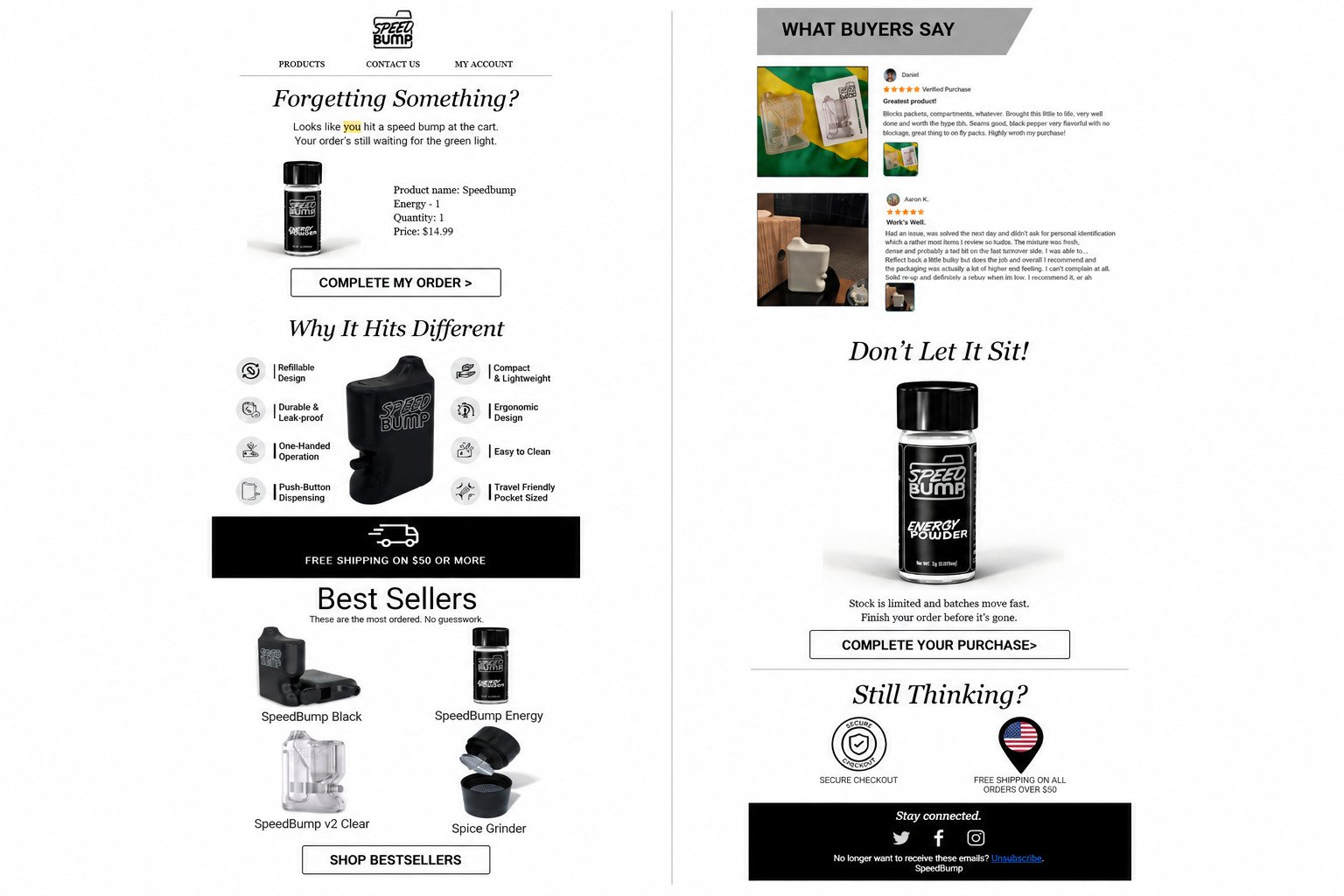
That email is long. For a $14.99 product, it is arguably longer than it needs to be, and the bestsellers block risks pulling attention away from the cart the shopper already filled. Worth testing a shorter variant against it.
The follow-up is a dedicated objection-handling email. The headline states “here is why customers choose us,” the call to action appears above the fold, and the eight-icon benefits grid answers the practical questions a buyer has about a product category they may not know well.
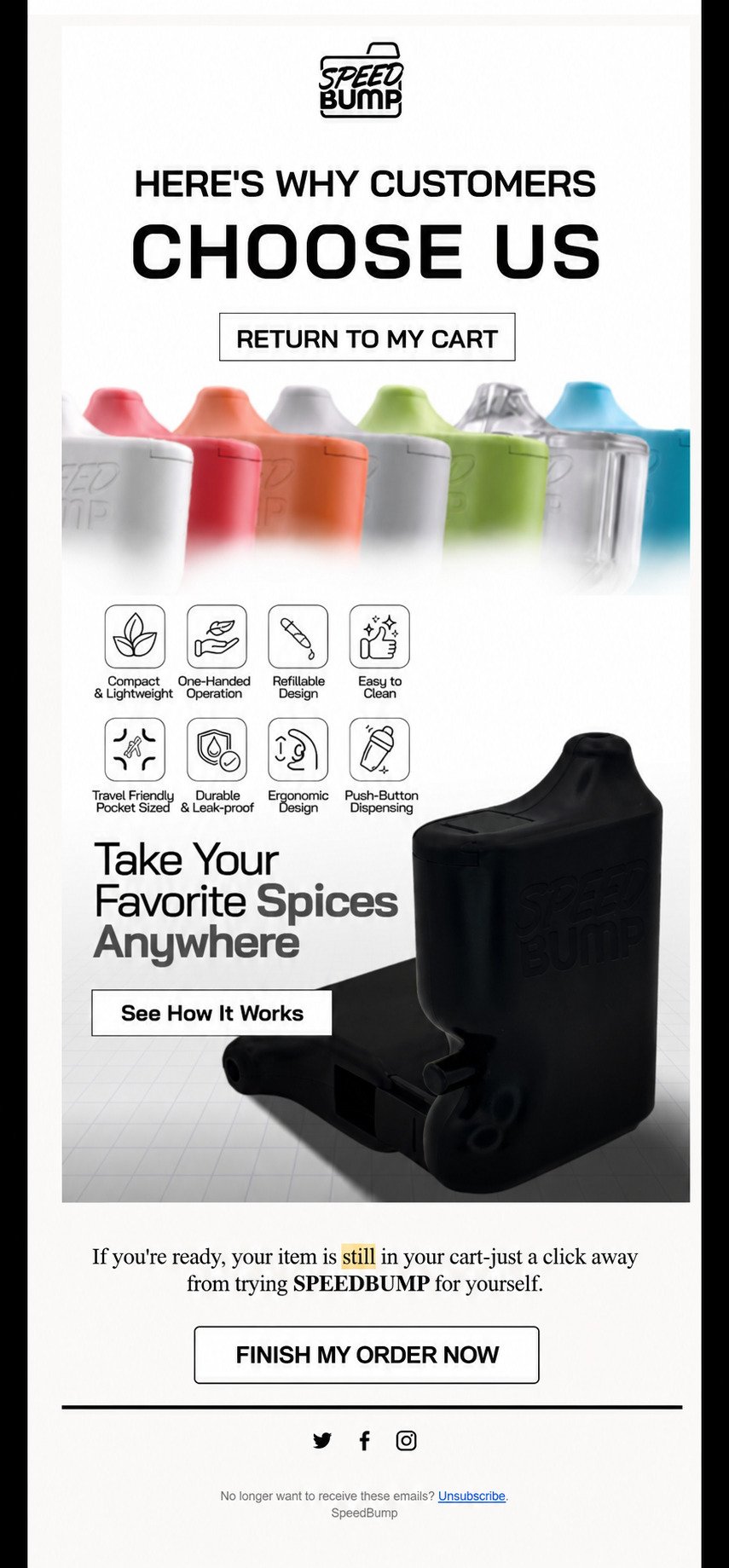
Steal this: giving objections their own email keeps the first message short and lets the second go deep. Note the call to action sits near the top rather than the bottom, which suits a reader who is already familiar with the product.
What All Six Have in Common
Across three unrelated brands and two very different price points, the same decisions repeat:
- Every call to action names the action, using complete my order, finish my order, or return to my cart rather than shop now
- Every email shows the product with its price, and most include quantity and variant detail
- Every brand runs a “why choose us” block, which is objection handling by another name
- Only one of the six carries a discount, and it appears in the final message rather than the first
- All six are single-column and built to read on a phone
Abandoned Cart Email Templates You Can Copy
These are starting points rather than finished emails. Replace the bracketed fields, rewrite the voice to match your brand, and test from there.
1. Impulse Purchase Sequence
For products under roughly $50 where nobody needs convincing, just reminding.
Email one, sent 1 to 2 hours after abandonment:
Subject: Your (product name) is still in your cart
Body: Hi (first name), you left (product name) behind. We saved it for you. (CTA: Finish checking out)
Email two, sent 24 hours later:
Subject: Last call on your (product name)
Body: Your cart is still waiting. (Product block with image and price.) Free returns within (number) days if it is not right. (CTA: Complete your order)
2. Considered Purchase Sequence
For higher-priced items where the shopper is genuinely researching.
Email one, sent 4 hours after abandonment:
Subject: Still thinking about the (product name)?
Body: No rush, (first name). We saved your cart so it is here when you are ready. (Product block.) (CTA: Return to cart)
Email two, sent 48 hours later:
Subject: What (number) customers say about the (product name)
Body: (Three customer reviews focused on the objections your support team hears most.) Plus (return policy), (warranty), and (shipping detail). (CTA: View your cart)
Email three, sent 96 hours later:
Subject: Questions about the (product name)?
Body: Reply to this email and a real person will answer. Or if it is not the right fit, here are a few alternatives. (Product recommendations.) (CTA: Talk to us)
3. High-Value Cart Sequence
For carts above your average order value, where a human touch pays for itself.
Email one, sent 2 hours after abandonment:
Subject: Your cart is saved, (first name)
Body: (Product block.) If you have any questions before you buy, just reply. (CTA: Return to cart)
Email two, sent 24 hours later:
Subject: A few things worth knowing before you order
Body: (Objection handling: shipping, returns, warranty, sizing.) (Social proof.) (CTA: Complete your purchase)
Email three, sent 72 hours later:
Subject: (First name), can we help?
Body: A personal note from a named team member offering direct assistance. For carts at this value, a reply-to-a-human email frequently outperforms any discount.
Writing these well is its own discipline. Our piece on making email marketing a real sales channel covers the copy principles that apply across every automated flow, not just cart recovery.
Should You Offer a Discount in Abandoned Cart Emails?
Not in the first email, and often not at all. Try a plain reminder first, then free shipping, and hold any percentage discount for the final message. Discounts do recover carts, but they also cost margin on purchases that would have happened anyway, and used carelessly they teach your best customers to abandon deliberately.
Run the arithmetic before deciding. On a $100 order at 40 percent gross margin, a 15 percent discount removes $15 from $40 of margin. That is a 37 percent reduction in profit on every recovered order, including the orders that would have converted from a plain reminder.
1. Try Free Shipping First
Given that roughly 40 percent of abandonment traces to extra costs, free shipping often addresses the actual objection at a lower cost than a percentage discount. It also feels like a bigger concession than it is.
2. Put the Offer Last, Never First
If the first email carries a discount, you have paid for every shopper who was simply interrupted. Hold any incentive until the third message, after the free options have had their chance.
3. Segment by Cart Value
A discount on a $400 cart may be worth it. The same discount on a $30 cart probably is not. Conditional logic in your flow can restrict offers to carts above a threshold where the recovered revenue justifies the margin given up.
4. Watch for Discount Training
Shoppers who abandon repeatedly and convert only on a discount have learned the pattern. Suppress offers from this group, or limit incentives to first-time buyers. Our guide to pricing strategy in a crowded marketplace covers the longer-term damage that habitual discounting does to brand positioning.
How Do You Reach Shoppers Who Never Gave You an Email?
You cannot email them, so the recovery has to happen on site. Capture email earlier in checkout, use exit-intent forms, keep carts persistent across sessions, and use on-site messaging for anonymous visitors. This is the part of cart recovery most guides skip entirely, and for most stores the unreachable group is the majority of abandoners.
A shopper who adds a product to their cart and leaves without ever entering an email address is invisible to your flow. No amount of subject line testing fixes that, because the message has nowhere to go. The largest recovery opportunity in most accounts is upstream of the email, in capture.
1. Capture Email Earlier in Checkout
Multi-step checkouts that request email on the first screen identify shoppers before the point where most of them leave. A single-page checkout that collects email last captures almost nobody who abandons.
2. Use On-Site Signup Forms Properly
A welcome offer form that converts well builds the identified audience your cart flow depends on. Exit-intent forms specifically catch people who are already leaving, which overlaps heavily with the abandonment population.
3. Connect Identification Across Sessions
Someone who subscribed three months ago and returns on the same device can often be recognized, which brings them into the cart flow even though they never logged in. This depends on your platform setup and cookie handling.
4. Use Onsite Messaging for Anonymous Visitors
For shoppers you cannot identify, the recovery has to happen before they leave. Exit-intent overlays, cart reminders in the interface, and persistent carts across sessions all work on people whose email you cannot reach. If your store setup is limiting what you can capture, our Shopify store management services cover the technical side of getting this configured correctly.
Improving capture rates by ten percentage points often produces more recovered revenue than any amount of copy testing on the emails themselves. It is the least glamorous fix available and frequently the largest.
How Abandoned Cart Emails Affect Deliverability
Cart flows carry a deliverability risk that campaigns do not, and almost nobody warns brands about it before something breaks.
Gmail and Yahoo began enforcing bulk sender requirements in February 2024. Any domain sending 5,000 or more messages per day to personal accounts must have SPF, DKIM, and DMARC configured, support one-click unsubscribe, and keep spam complaint rates below 0.3 percent. Google escalated enforcement in November 2025 from temporary delays to permanent rejections, and Microsoft introduced comparable rules for Outlook and Hotmail addresses in May 2025.
The threshold is tighter than it sounds. A sender delivering 10,000 emails needs only 30 spam reports to reach 0.3 percent. Google advises staying below 0.1 percent and treats 0.3 percent as a hard ceiling rather than a target. Senders who cross it become ineligible for delivery mitigation until they stay below the line for seven consecutive days.
1. Why Cart Flows Generate Complaints
Cart emails frequently go to people captured at checkout who never explicitly opted into marketing. Those recipients did not expect your email, which makes them far more likely to hit the spam button than someone who subscribed deliberately. A cart flow sending to unconsented addresses can quietly push your whole domain toward the threshold.
2. Protect the Sending Domain
Use a subdomain for marketing email so a problem in the cart flow does not damage the domain carrying your order confirmations and shipping notices. Keep authentication configured correctly across all of it.
3. Cap the Sequence and Honor Suppression
Three emails is the practical limit. Suppress anyone who has unsubscribed, anyone with an open support ticket, and anyone who already purchased. Sending a recovery email to someone who completed the order is a reliable way to generate a complaint.
4. Monitor Before It Breaks
Google Postmaster Tools and Yahoo’s feedback loop show complaint rates by domain. Check them monthly rather than discovering a problem through a revenue drop. Deliverability damage takes weeks of clean sending to repair and costs far more than the flow earns in that period.
How Do You Know If Your Cart Emails Actually Work?
Cart flows report impressive numbers. Open rates run high, click rates run high, and attributed revenue looks substantial. The harder question is how much of that revenue would have arrived without the email.
Someone who abandons a cart at lunch and buys from their laptop that evening gets attributed to the cart email if they opened it along the way. The flow takes credit for a sale that was already happening. This is not a flaw in any particular platform; it is how last-touch attribution works.
1. Run a Holdout Test
Withhold the cart flow from a small random share of abandoners, commonly 5 to 10 percent, and compare their conversion rate against the group receiving emails. The difference is your actual incremental lift. It is almost always lower than attributed revenue suggests, and it is the only number worth planning against.
2. Measure Revenue Per Recipient, Not Open Rate
Open rate tells you the subject line worked. Revenue per recipient tells you the email worked. When comparing versions, that is the metric that should decide which one stays.
3. Track Margin, Not Just Revenue
A flow that recovers $40,000 with discount codes attached is not comparable to a flow that recovers $30,000 at full price. Report recovered margin alongside recovered revenue, or you will optimize toward the wrong answer.
4. Separate the Triggers in Reporting
Checkout abandonment converts at a far higher rate than browse abandonment. Reporting them as one number hides which part of the flow is doing the work and which part needs rebuilding. If you want this measured properly across your whole program rather than flow by flow, that is what our email marketing services are built to handle.
Common Abandoned Cart Email Mistakes
Most underperforming cart flows share the same handful of problems.
1. Sending the First Email Too Soon: A message that arrives fifteen minutes after abandonment reaches someone who is still deciding, and it reads as surveillance rather than service.
2. Leading With a Discount: The first email should never carry an offer. You are paying to recover shoppers who were going to come back on their own.
3. Hiding the Cart Contents: An email that does not show the product, price, and variant forces the shopper to remember something they already forgot once.
4. Running the Same Sequence for Every Cart Value: A $25 cart and a $900 cart need different messages, different timing, and different offers. One sequence for both wastes the high-value opportunity.
5. Treating the Email as Transactional: It is a commercial message under US law. Sending it without an unsubscribe link, a physical address, and advertisement identification creates exposure on every send.
6. Ignoring Suppression Logic: Emailing someone who already purchased, already unsubscribed, or has an open support ticket produces complaints that damage deliverability for the entire list.
7. Optimizing Open Rates Instead of Revenue: A subject line that wins on opens and loses on revenue per recipient is the wrong winner, and plenty of tests get called on the wrong metric.
8. Never Testing Against a Holdout: Without a control group, you cannot distinguish recovered revenue from revenue that was arriving anyway, which means you cannot tell whether the flow deserves more investment or less.
Final Thoughts
Learning how to regain sales with abandoned cart emails is less about clever copy than most guides suggest. The brands recovering the most revenue are the ones that identify more shoppers before they leave, match the sequence to their actual purchase cycle, hold discounts back until the free options have been tried, and protect the sending reputation the whole program depends on.
Start with diagnosis rather than templates. Find out why your shoppers abandon, build the sequence around that specific blocker, and measure it against a holdout so you know what the flow is genuinely contributing. Most accounts find their biggest gain upstream in capture rather than in the emails themselves.