

It’s no secret that selling on eBay can be a great way to skyrocket your sales. However, you need to be careful so you don’t lose money on the platform. Setting prices can be extremely important when it comes to being profitable.
Are you planning to start selling on eBay and want to list your product at the best possible price? If so, let’s learn what factors you need to consider while pricing your products.
In this article, we’ll help you to set prices for your products and share the best eBay seller tips. This will allow you to improve your eBay pricing strategy and maximize your profits to avoid leaving money on the table.
Select the Listing Format
eBay allows you to choose between two types of listings: Action-style listings and fixed-price listings. Before creating your eBay pricing strategy, you need to select one of the formats for your listing.
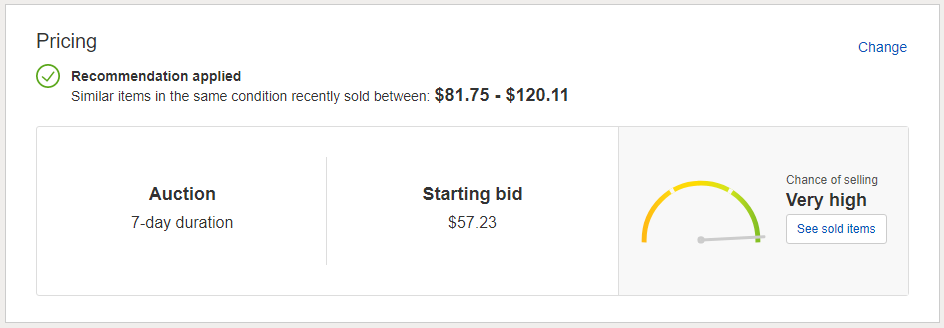
1. Auction Listing
In this format, you set the initial price and then the buyers bid on the listing. The buyer with the highest bid gets the item. This kind of listing is best suited for exclusive, unique, and high-profile items. Used items can also be listed as auctions if you are not sure about their market value. The items are usually listed at a lower price, which goes up as the buyers raise the bid.
2. Fixed Price Listing
This type of listing is most suitable for items that have a high sales volume. You set a fixed price for an item after determining the profit margin, and the customers can buy it at the Buy It Now price.
Also Read: Effective Strategies to Maximize Sales on eBay
6 eBay Pricing Strategies to Drive Sales and Profits
1. Know Your Costs
One factor to consider when pricing your products is their cost. How much did it cost you to make or source the product? How much does it cost to ship the product?
Sometimes, you will also want to include your advertising and marketing costs, eBay fees, and payment processing fees, i.e., those charged by PayPal.
These are essential factors to consider, as you don’t want to price your product so low that you lose money on the sale or so high that buyers run away from it!
2. Know Your Competition
The first thing to do after analyzing the cost of the product is to know how many sharks are in the sea. Look more closely at the cost of comparable products that are being sold on eBay.
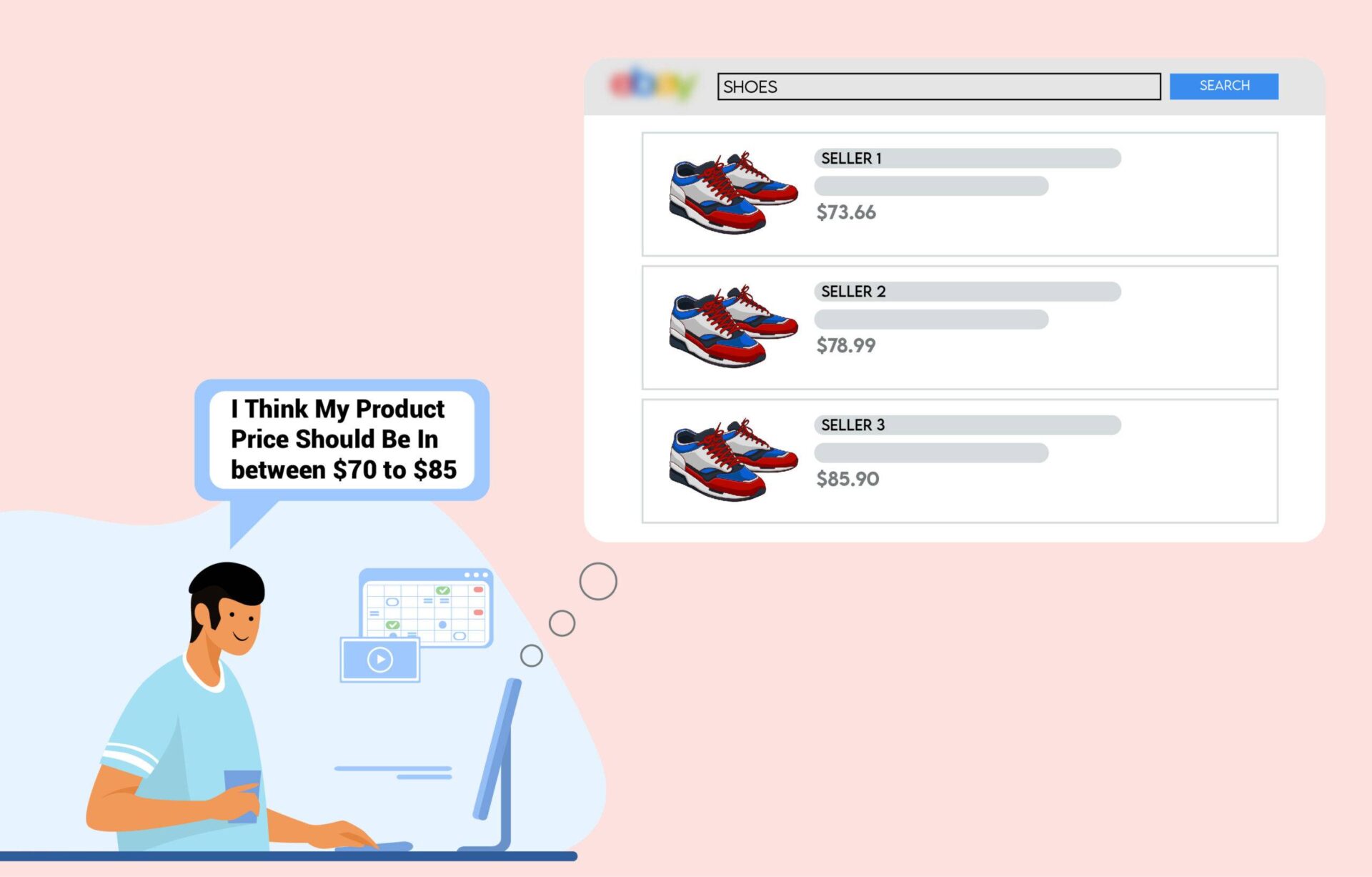
Here, you can see how much the item sold for, how many bids were placed, and what the shipping cost was. This information can give you a good idea of what buyers are willing to pay for an item and what shipping costs you should expect.
You can also get an idea of your competition by looking at the “Seller Information” section on each listing. This section contains the seller’s feedback rating as well as the number of feedback received. It will give you a good idea of what prices are reasonable.
3. Avoid Undercutting
eBay is a marketplace that thrives on competition. Undercutting your prices to make a sale may be good for you. If you are a new seller, you cannot compete with other sellers who have been selling on eBay for a long time. Undercutting prices to make a sale is a short-term scheme, and when your competitor starts doing the same, it will eventually start a price war, which is definitely not good for you.
4. Use eBay’s “Average Selling Price”
Listing your items at the right price will help you sell more. Look for similar products on eBay to get an idea of what other sellers are charging.
If you’re not sure how much you should charge or aren’t sure of your item’s value, you can use eBay’s search function to help you find similar listings and decide on a price.
5. Use eBay’s Best Offer Feature
The Best Offer feature allows you to potentially increase sales by giving buyers the option to negotiate prices. Set a minimum acceptable price to ensure you don’t undersell your items. The Best Offer feature ensures that you don’t miss out on any potential sales.
6. Pricing Psychology
When selling on eBay, a lot of effort goes into pricing your items correctly. Not only do you need to account for the cost of the item itself, but you also need to consider factors like shipping, taxes, and other listing fees that may apply. And on top of that, you need to ensure that your prices are competitive enough to attract buyers.
But many sellers don’t realize that there is another important factor to consider when creating an eBay pricing strategy: pricing psychology.
How you price your items can significantly impact how likely people are to buy them. And by understanding the psychology behind pricing, you can help increase your chances of making a sale.
Here are a few eBay pricing approaches to keep in mind when selling on eBay:
(a) The Odd-Even Effect
Regarding pricing, people tend to respond more favorably to prices that end in odd numbers (like $5.99 or $9.99) than prices that end in even numbers (like $6.00 or $10.00). It is because odd numbers are perceived as being more favorable and tend to stick out more in our minds.

So, if you’re looking to make a quick sale, it’s worth pricing your items with an odd number at the end.
(b) The Left-Digit Effect
Another pricing psychology phenomenon you should be aware of is the left-digit effect. This is the tendency for people to focus more on the first digit in a price than on the other digits that follow.

For example, if you’re selling an item for $49, people are more likely to perceive it as a better deal than one for $50 since they get to save a dollar.
Also Read: How to create a top-selling eBay product listing.
How to Set a Reserve Price on eBay?
To set a reserve price on eBay, choose the Auction-style listing. This lets you define a hidden minimum price; if bids don’t reach it, you’re not required to sell the item. Below are the steps to add a reserve price:
- Create or Edit a Listing: Go to Seller Hub or My eBay Selling and start a new listing or select ‘Revise’ on an existing one (item must have no bids and at least 12 hours left).
- Navigate to Pricing: Scroll to the Pricing section of the listing form.
- Enter the Reserve Price: Type the lowest amount you’re willing to accept. If the option isn’t available, your category may not support reserves.
- Review the Fee: eBay charges a non-refundable fee (often 4% of the reserve price) regardless of whether the item sells.
- Finalize: Complete your listing details and select List your item.
The following are some critical considerations to keep in mind while adding a reserve price:
- The “4% Rule”: Reserve fees are among the priciest listing upgrades. Many sellers opt to set a higher starting bid at the minimum price they’ll accept to avoid this cost.
- Visibility: Bidders see a “Reserve not met” message until the hidden reserve is reached.
- Minimum Threshold: Some regions, like the UK, enforce a minimum reserve (e.g., £50) for high-value items.
What Are the Common Mistakes to Avoid While Setting a Reserve Price on eBay?
Below are the common mistakes to avoid while setting a reserve price:
- Ignoring the Non-Refundable Fee: Fee is usually $5 or 7.5% of the reserve (whichever is higher), capped at $250. Listing a $500 reserve that doesn’t sell still costs ~$37.50, which can quickly cut into profits.
- Setting the Reserve Too Close to the Starting Bid: If your starting bid is $90 and the reserve is $100, just set the starting bid at $100 to save fees and avoid frustrating buyers.
- Creating a “Bidding Barrier”: “Reserve Not Met” labels discourage bidders, reducing momentum and final auction price.
- Forgetting the “Buy It Now” Alternative: List as Fixed Price (Buy It Now) with Best Offer enabled to reject lowball offers while showing your target price.
- Not Lowering the Reserve When Interest is Low: If bids are missing with 24 hours left, lower or remove the reserve to alert watchers and spark last-minute bidding.
- Using Reserves on Common Items: Reserves suit high-value or rare items. Using them on standard products like phones or sneakers drives buyers to transparent listings.
Can I Change the Reserve Price After Listing on eBay?
Yes, you can lower or remove your reserve price after listing, but generally, you cannot increase it. The rules for changing your reserve price depend on the current bidding status and time remaining:
When Can You Change the Reserve Price?
You can lower or remove the reserve price if:
- No bidder has met the current reserve.
- At least 12 hours remain in the auction.
- No bids have been placed yet (you can also add a reserve if none was set).
Here is how you can change the reserve price:
- Go to Seller Hub or My eBay Selling.
- Find your item and select Revise from the “More actions” dropdown.
- In the Pricing section, enter the new lower amount or remove it.
- Select Continue to save the changes.
What happens after you change the reserve prices?
Here is what happens when you change the reserve prices:
- Buyer Notifications: eBay notifies bidders that the reserve has been lowered or removed.
- High Bid Adjustments: If the new reserve is below the current high bid, eBay reduces that bid to $1 below your new reserve.
- No Fee Credit: You won’t get a refund for the original reserve price fee.
When Can You Not Change the Reserve Price?
You can not change the reserve prices in the following cases:
- Bids have already met the reserve.
- Less than 12 hours remain in the auction.
- You cannot raise the reserve price once the auction has started.
Wrapping Up!
After reading this eBay pricing guide, you should be more familiar with how to set prices for your products. Remember to keep your eBay pricing strategy competitive and profitable, and consider all the costs while selling your product. By doing this, you’ll surely make a profit on every sale.