
Google Shopping ads are product listings with an image, a price, and a store name that appear when someone searches for something to buy. For most ecommerce brands, they are the most direct way to put a product in front of a shopper who is already looking for it, and they behave very differently from the text ads most advertisers learned on.
They also changed more in 2026 than in any year since Performance Max arrived. Shopping ads now appear inside Google’s AI Mode conversations, Google introduced a new layer of automation called AI Max for Shopping, and a pilot called Direct Offers lets retailers present discounts at the moment a shopper looks ready to buy.
This guide explains how Google Shopping ads work, how the campaign types differ, and how ads behave in AI Mode. It also highlights what changed in 2026, what Shopping ads really cost, how to judge that cost against your margin, how to set up and optimize a campaign, and what Amazon sellers need to know before starting.
What Are Google Shopping Ads?
Google Shopping ads, also called product listing ads, are paid product listings built from a retailer’s product data rather than written by hand. Each ad shows a product image, title, price, and store name, and can include ratings, promotions, and shipping details.
They appear across several Google surfaces. According to Google, you manage your Shopping ads in Google Ads using Shopping or Performance Max campaigns, and the ads can show on the Search results page, the Shopping tab, Google Images, and, since 2026, within AI Overviews and AI Mode.
Paid Shopping ads are separate from free listings. Free listings let products appear on Google surfaces without paying per click, while Shopping ads compete in an auction for more prominent placement. Both draw on the same product data, which is why the quality of that data matters for both.
How Do Google Shopping Ads Work?
Google Shopping ads work by matching your product data to what people search for. You do not choose keywords. You supply a product feed, and Google decides which searches your products are relevant to, then enters them into an auction for those searches.
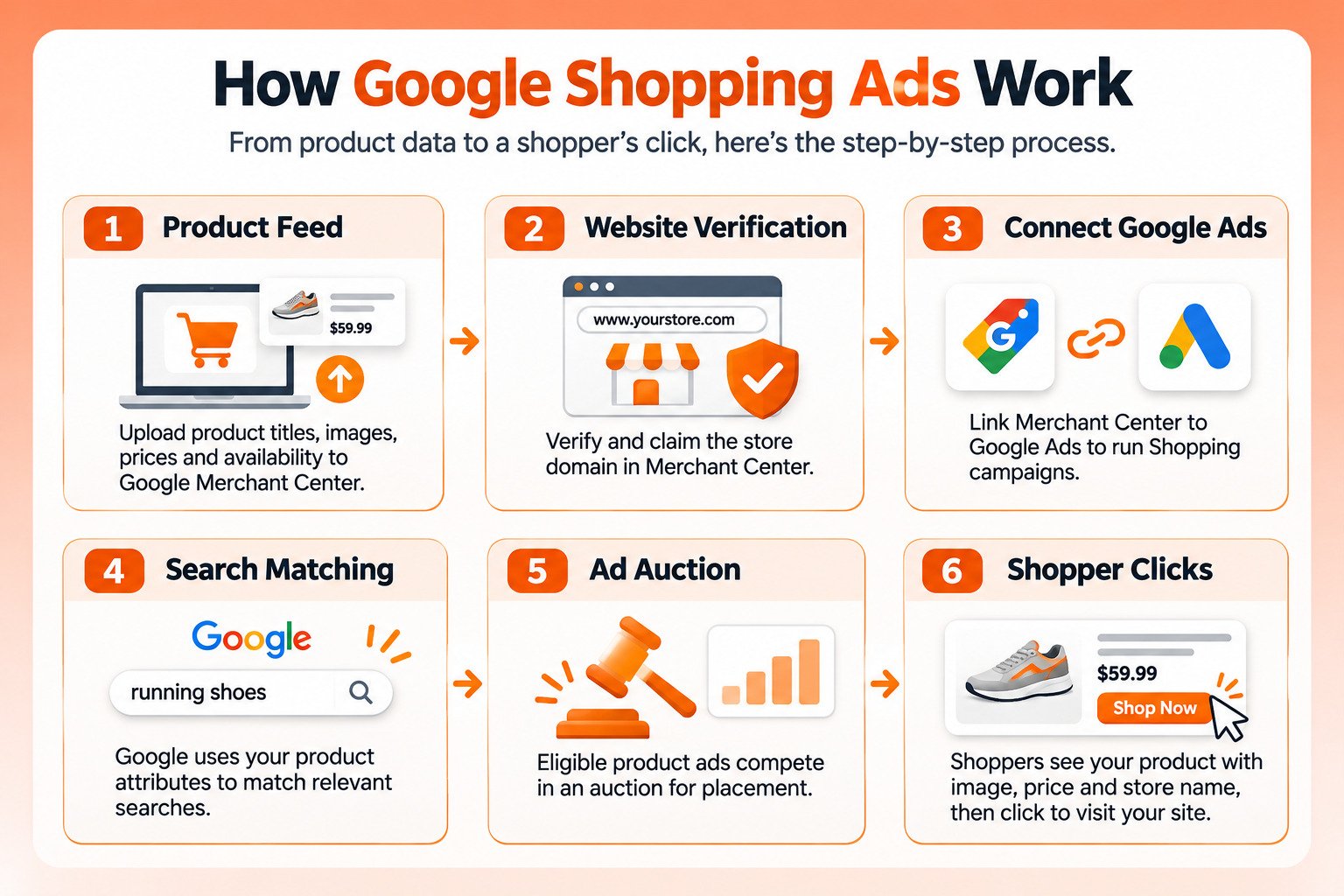
1. Your Product Data Lives in Merchant Center
Google Merchant Center holds your product feed: titles, descriptions, images, prices, availability, and identifiers. Note that Google recently removed the “Next” branding and now calls the platform simply Google Merchant Center, so guides that still refer to “Merchant Center Next” are out of date.
2. Your Website Must Be Verified and Claimed
Merchant Center requires you to verify and claim the website your ads will send people to. Only one Merchant Center account can claim a given website, and your ads must link to that claimed domain.
3. Merchant Center Connects to Google Ads
Linking Merchant Center to Google Ads makes your products available to Shopping and Performance Max campaigns. Bids, budgets, and targeting are managed in Google Ads, while the products themselves are managed in Merchant Center.
4. Google Matches Products to Searches
When someone searches, Google uses your titles, descriptions, categories, and attributes to judge relevance. This is why feed quality does the work that keyword selection does in a Search campaign. A vague title loses searches a precise one would have won.
5. The Auction Decides Placement
Relevant products compete in an auction, and you pay when someone clicks. Your bid, the quality of your product data, and how likely the ad is to be clicked all influence where your product appears and whether it appears at all.
Standard Shopping vs Performance Max vs AI Max for Shopping
There are now three ways to run Shopping ads, and the differences come down to control versus automation.
| Feature | Standard Shopping | Performance Max | AI Max for Shopping |
|---|---|---|---|
| What it is | A dedicated Shopping campaign | An all-channel campaign that includes Shopping | Optional AI features added to Standard Shopping |
| Where ads show | Shopping placements on Google | Search, Shopping, YouTube, Display, Gmail, and more | Shopping placements plus conversational and long-tail searches |
| Control | Highest: product groups, bids, and structure | Lowest: Google allocates across channels | Keeps Standard Shopping structure, adds automation |
| Best for | Brands that want product-level control | Brands that want cross-channel reach | Brands that want broader reach without switching to Performance Max |
AI Max for Shopping is the newest. Google introduced it on April 30, 2026, adding text customization, final URL expansion, and format selection to standard Shopping ads. It rolled out as an opt-in beta layered on top of existing Standard Shopping campaigns.
Performance Max Is Not Being Replaced
Some guides claim AI Max for Shopping is replacing Performance Max, with a forced migration coming, but Google’s own announcement says otherwise. AI Max for Shopping is an option for advertisers who want broader reach while keeping a Shopping campaign structure, not a replacement.
Smart Shopping campaigns also no longer exist as a separate type, even though some guides still list them. Our complete guide to Performance Max campaigns covers how that campaign type works in more depth.
How Do Google Shopping Ads Work in AI Mode and AI Overviews?
Shopping ads can now appear inside Google’s AI-generated answers, and existing campaigns are included automatically. Google states that existing Search, Shopping, and Performance Max campaigns are automatically eligible to serve ads within AI Overviews and AI Mode. No new campaign or budget is needed, and ads are billed through the same auction and cost-per-click model as standard Search ads.
1. Shopping Ads Can Match Conversational Questions
Google matches ads in two ways: directly to a product search, or contextually to both the question and the AI’s answer. Shopping campaigns are eligible for both. Google’s own example is someone asking why their pool is green, where the AI response explains cleaning steps and Shopping ads for pool vacuums or algae treatment can appear. Your products can now reach people who never searched for a product at all.
2. Google Writes Text Next to Your Ad
Some placements include “AI explainers,” short text generated by Google’s Gemini models to explain how an ad relates to the shopper’s question. Google says these can draw on publicly available sources including your website, and that advertisers can’t manually write, edit, approve, or opt out of them. Keeping your website accurate and current is now part of keeping your ads accurate.
3. You Cannot Opt Out or Isolate It
Google does not let you target only AI Mode or opt out of it separately from Search. Performance in AI Overviews and AI Mode is included in aggregate in standard campaign reports, so you cannot see your AI Mode Shopping results on their own.
4. Availability Is Still Limited
Ads within AI Overviews and AI Mode currently run in English in the United States, Australia, Canada, India, Indonesia (AI Overviews only), Kenya, Malaysia, New Zealand, Nigeria, Pakistan (text ads only), the Philippines, and Singapore, with Google expanding the list over time.
The same product data that powers these ads also determines how visible you are across AI-driven search more broadly, which we cover in our guide to brand visibility in AI search.
What Changed in Google Shopping in 2026?
The main changes this year, in order:
- February: Shopping ads began appearing in AI Mode.
- April 20: Sponsored products moved into the organic-only free listing grid on the Shopping tab.
- April 30: Google introduced AI Max for Shopping for Standard Shopping campaigns.
- May: Google expanded the Direct Offers pilot, covered below.
- October 15: Channel prioritization and budget allocation controls began rolling out progressively, including for Shopping campaigns.
- Autumn: Ads in AI Mode expanded to more countries and began appearing across follow-up questions in AI Mode conversations.
- Ongoing: Passkeys are being rolled out for sensitive Merchant Center actions, and a higher image size minimum takes effect January 31, 2027.
Direct Offers, a Pilot Worth Watching
Google introduced Direct Offers in January 2026, describing it as a new Google Ads pilot that allows advertisers to present exclusive offers, like a special 20% off discount, for shoppers who are ready to buy directly in AI Mode. Retailers set up the offer, and Google decides when it is relevant to show.
At Google Marketing Live in May, Google said AI Max and PMax advertisers can now natively create Direct Offers within the Google Ads UI and set value limits so offers stay active without overspending. Google also announced promotion bundling and native checkout for merchants using its Universal Commerce Protocol, though checkout through that protocol is limited to select merchants and Google has not published a launch date for bundling.
What Is the Cost of Google Shopping Ads?
Google Shopping ads are priced per click through an auction, so there is no fixed price. What you pay depends on your category, competition, product data quality, bids, and season. The more useful question is not what the average click costs, but what you can afford to pay per sale.
Why Published Averages Are Unreliable
One figure appears constantly in guides on this topic: an average Shopping cost per click of $0.66 alongside a 1.91% conversion rate. The same two numbers also appear in pounds in a UK agency’s dataset, which means at least one version is mislabeled, and both datasets published in 2026 that disclose their methods put Shopping clicks at roughly double that figure. We would not plan a budget around it.
What Two 2026 Agency Datasets Show
Two agencies published Shopping figures in 2026 along with their methods. Olifant Digital reported medians across 19 ecommerce accounts in the US, Europe, the UK, and Canada, with Standard Shopping running in nine of them. Shopiator reported averages across 25 accounts in the US, UK, Canada, and Australia, with Shopping running in 23.
| Metric | Olifant Digital (median, 9 accounts) | Shopiator (average, 23 accounts) | Shopiator (US accounts) |
|---|---|---|---|
| Cost per click | $1.08 | $1.32 | $1.34 |
| Conversion rate | 3.9% | 2.24% | 2.04% |
| Cost per conversion | $23.78 | $59.09 | $65.60 |
| Return on ad spend | 3.44 | 2.81 | 2.82 |
The more revealing finding is where the two disagree. Olifant found Standard Shopping returned more than Performance Max, at 3.44 against 2.50. Shopiator found the reverse, with Performance Max at 4.37 against Shopping at 2.81. Same platform, same year, opposite conclusions. Each dataset reflects the brands that agency happens to manage, and both are small samples reported through Google’s own attribution.
The direction of travel is clearer. Data from Channable covering European ecommerce found that cost-per-click on Google’s Shopping and Performance Max campaigns rose 15 percent year-over-year between June 2025 and June 2026, while average return on ad spend fell 46 percent on Performance Max and 43 percent on Standard Shopping. That is European data, but it matches what many advertisers report: clicks are getting more expensive.
Calculate Your Break-Even ROAS Instead
The number that decides whether Shopping ads work for you is your break-even return on ad spend. It equals one divided by your gross margin.
- Find your gross margin per product, after product cost, fulfillment, and payment fees.
- Divide one by that margin. A 40 percent margin gives a break-even ROAS of 2.5.
- Any ROAS above that figure is profitable on the first order. Anything below it is losing money, unless repeat purchases make up the difference later.
The same ROAS can be excellent for one brand and ruinous for another. At a 60 percent margin, a ROAS of 2.5 is comfortably profitable. At a 35 percent margin, the identical ROAS loses money on every first order. Set targets from your margin, then use outside figures only as a rough reference.
Are Google Shopping Ads Worth It?
For most ecommerce brands with healthy margins and good product data, yes. The benefits of Google Shopping ads are hard to replicate through other channels.
- They reach shoppers at the moment of buying intent, with the product, price, and image visible before the click.
- They pre-qualify clicks, since someone who clicks has already seen the price.
- They now extend into AI Mode and conversational searches without extra setup.
- They build on a single product feed that also powers free listings.
They are a poor fit in some situations. Brands with thin margins may struggle to clear break-even ROAS once clicks inflate in competitive categories. Brands with weak product data will pay for poor relevance. And products that depend on a long explanation before purchase often do better starting with Search or content.
If you are already running Google Ads and unsure whether Shopping is pulling its weight, an account audit is usually the fastest way to find out.
How Do You Set Up a Google Shopping Campaign?
Setting up a Google Shopping campaign follows the same sequence for most stores.
- Create a Google Merchant Center account and add your business information, shipping, and return policies.
- Verify and claim your website domain in Merchant Center.
- Upload your product data, either through a feed file, a scheduled fetch, or a platform integration such as Shopify’s.
- Resolve any issues flagged in the Needs attention tab before going further.
- Link Merchant Center to your Google Ads account.
- Create a Shopping or Performance Max campaign, select your products, and set a budget and bid strategy.
- Set up conversion tracking so Google Ads can measure sales accurately.
For Shopify stores, much of the feed setup can be handled through the platform’s Google integration, though the product titles and attributes still need deliberate work. Our Shopify store management services cover that setup alongside the store itself.
How Do You Optimize Google Shopping Ads?
Shopping ad performance is decided mostly by product data, then by campaign structure, then by bidding. Most accounts underinvest in the first and overinvest in the last.
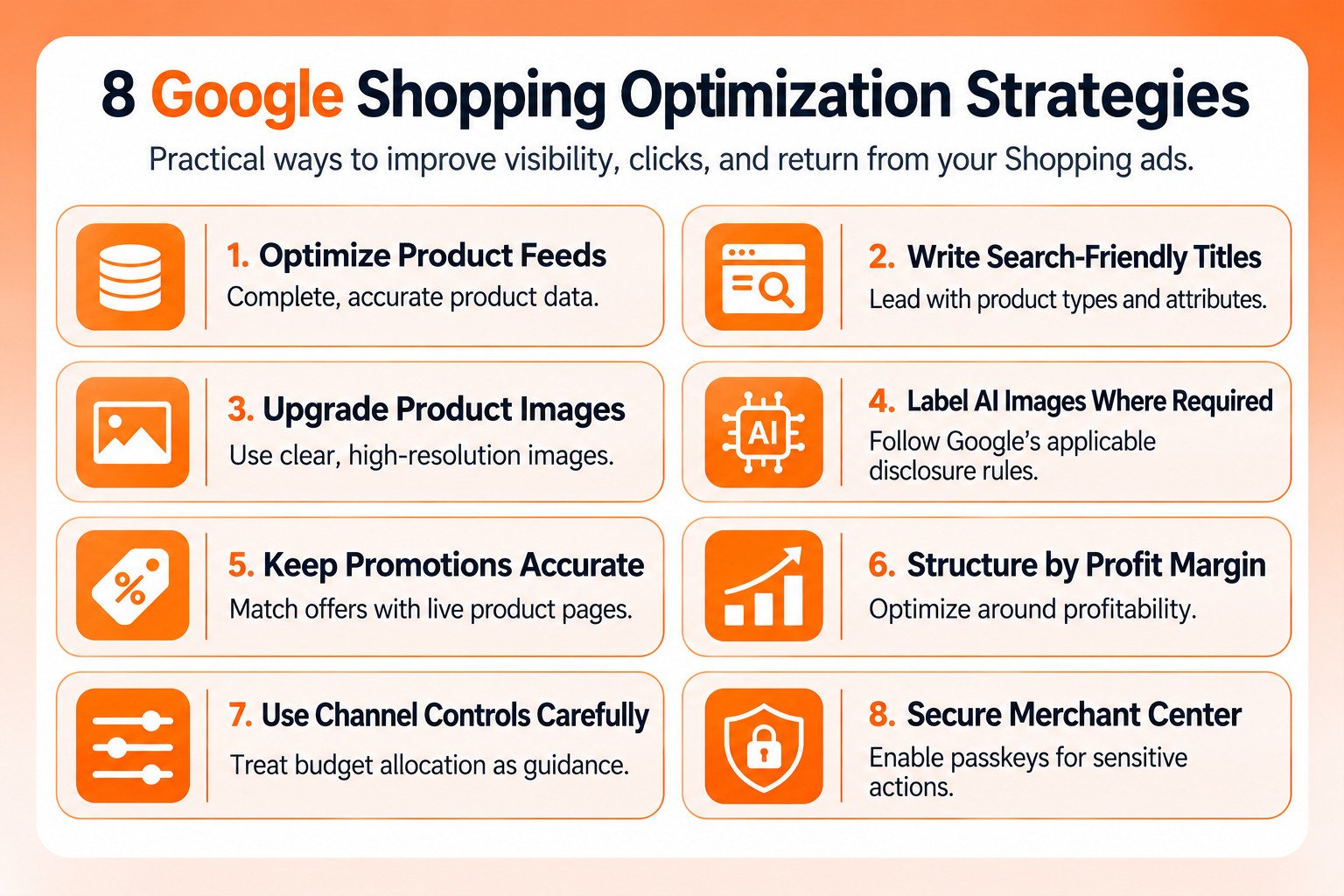
1. Build a Complete, Accurate Feed
Google’s own guidance for Shopping ads in AI surfaces is a useful checklist for every placement. Your product data should match your landing pages and include descriptive titles and descriptions, multiple high-resolution product and lifestyle images, accurate pricing and sale prices, product ratings and highlights, and clear shipping and return policies, according to Google.
2. Write Titles for Search, Not Branding
Lead titles with the words shoppers actually use: product type, key attribute, size or variant, and brand where it matters. A title that reads well on your homepage can match almost no searches.
3. Meet the New Image Requirements
Google has announced that product images must be at least 500 by 500 pixels, with enforcement beginning January 31, 2027. Until then, the older minimums apply, and Google may serve optimized versions of some smaller images. Merchant Center already shows warnings for images that will fall short, and you can download a list of affected products from the Needs attention tab.
Image quality is a separate issue from size. Blurry or pixelated images do not get products removed, and Google notes that your product will continue to show in ads and free listings, but it also says high image quality correlates strongly with clicks.
4. Label AI-Generated Images Where Required
If you use AI-created or AI-edited product images, regulations in the European Union, India, and New York can require disclosure. Google provides an AI label setting in Google Ads and Merchant Center for this, and using it does not violate its rules on text overlays.
5. Keep Promotions Accurate
Google can extract eligible live promotions from your product pages and showcase them automatically on free listings and Shopping ads. That makes accurate on-site promotion details important, since outdated offers can end up displayed in your ads.
6. Structure Campaigns by Margin
Group products by profitability rather than by category alone. High-margin products can carry more aggressive bids. Low-margin products need tighter targets or may not belong in paid campaigns at all.
7. Use the New Channel Controls Carefully
Channel prioritization lets you set Google Search and search partners to different priority levels within Shopping campaigns. Google describes the budget allocation side as best-effort rather than a guarantee, so treat it as guidance for spend rather than a hard cap.
8. Secure Your Merchant Center Account
Google is rolling out passkey requirements for sensitive actions like website or URL changes and admin and user management. Set passkeys up before peak season, so a locked admin action does not stall a fix during your busiest weeks.
Google Shopping Ads Examples
Every Shopping ad uses the same building blocks, so the examples below show how those pieces combine. These are illustrative examples rather than live ads.
Example 1: Arcade Machines on Google Search
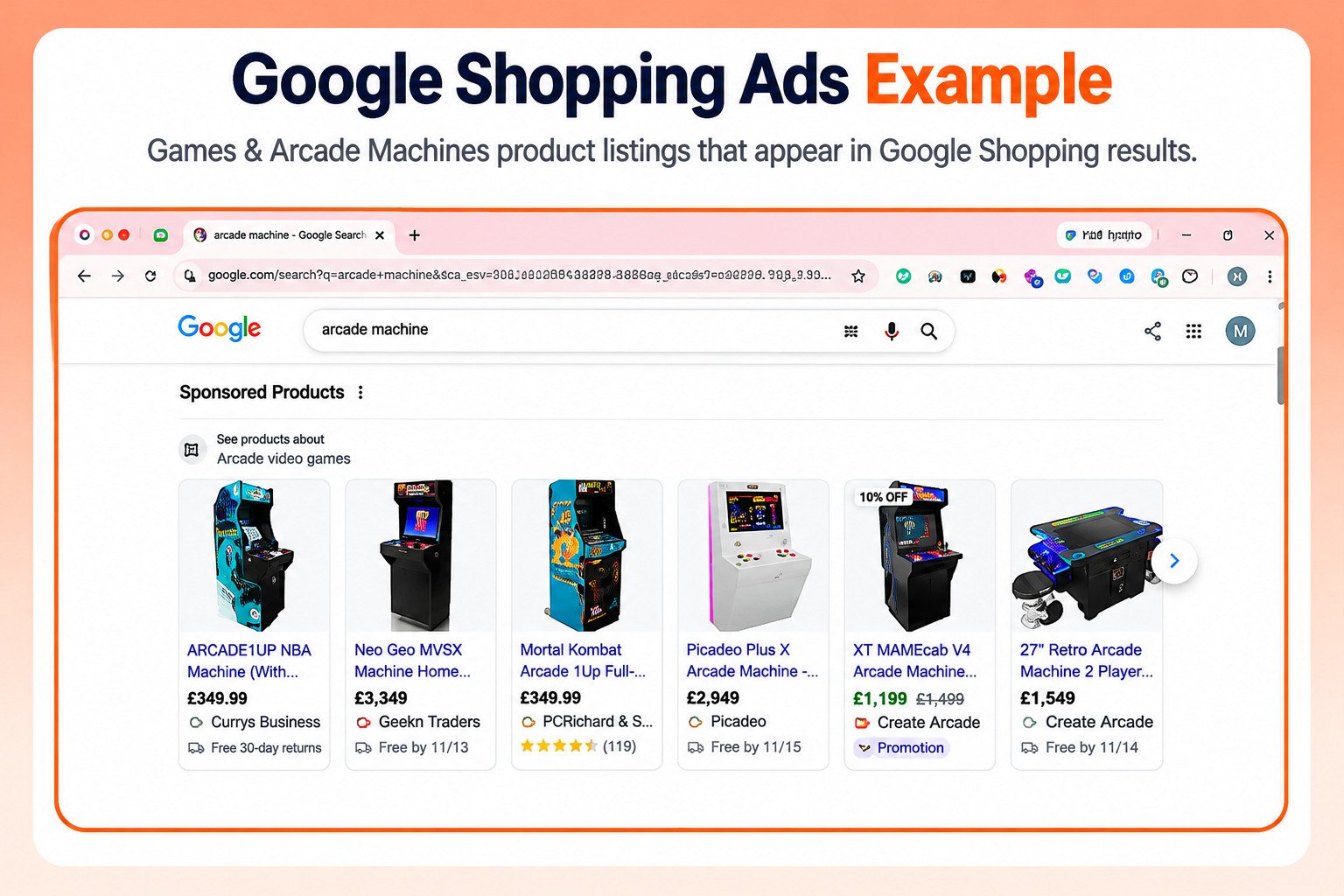
A search for “arcade machine” brings up a row of sponsored products above the regular results, under a “See products about Arcade video games” heading. Six listings fit in the first view, ranging from full-size cabinets to a two-player table machine.
- Price does the filtering. Prices run from £349.99 to £3,349, so shoppers can rule products in or out before they click.
- Sale prices stand out. One listing shows its current price in green against a crossed-out original price, with a discount badge on the image and a Promotion label under the store name.
- Delivery and returns appear inside the ad. Lines such as “Free by 11/13” and “Free 30-day returns” answer the shipping question before the shopper reaches your site.
- Ratings add trust. A star rating with 119 reviews makes one listing look more established than its neighbors at the same price.
- Titles are cut off after a few words. “Arcade Machine…” and “Machine Home…” show how little of a title survives, which is why the most important words need to come first.
Example 2: Shampoo on the Google Shopping Tab
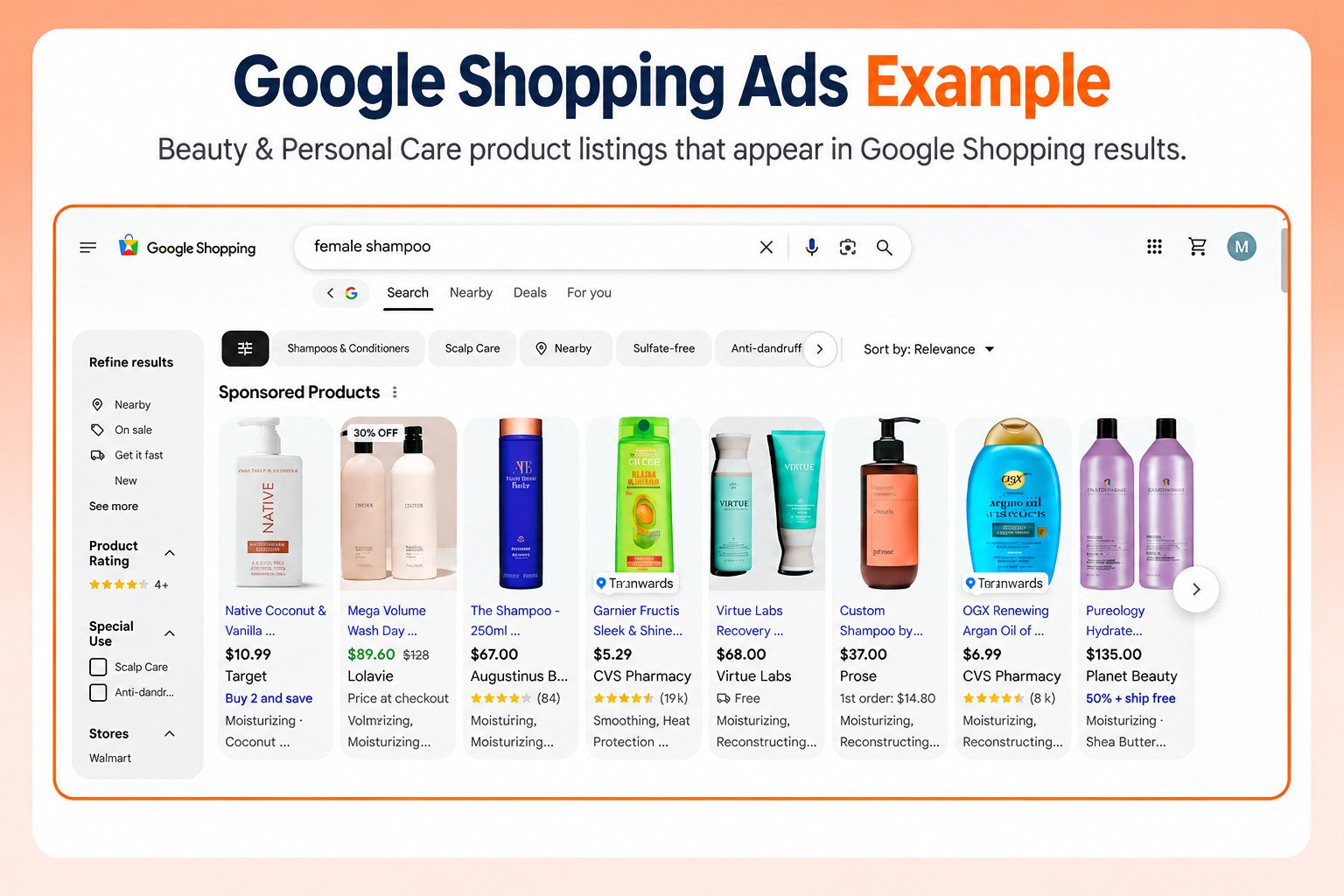
On the Shopping tab, a search for “female shampoo” shows sponsored products alongside filters for rating, special use, and store. Shoppers can narrow results with chips such as Sulfate-free, Scalp Care, and Anti-dandruff before they scroll.
- Promotions take several forms in one row: a 30% OFF badge, “Buy 2 and save,” “50% + ship free,” and a lower first-order price on a $37.00 product.
- Product attributes appear under the store name, such as Moisturizing, Smoothing, Heat Protection, and Reconstructing. Complete attribute data in your feed helps your listing show the details shoppers filter by.
- Review counts vary enormously, from 84 to about 19,000. A listing with few reviews has to win on price, image, or offer instead.
- Some listings show “Price at checkout” or “Free” delivery instead of a standard price line, which changes how the offer compares at a glance.
- Store labels show who is selling, so brand websites and large retailers compete side by side in the same row.
Can Amazon Sellers Use Google Shopping Ads?
Yes, but not to send shoppers to an Amazon listing. Shopping ads have to point to a website you own and have claimed in Merchant Center.
Google’s landing page requirements are explicit. Only link to the domain from your Merchant Center account, and don’t redirect people to another website outside of the domain you claimed. Since you cannot claim amazon.com, an Amazon listing cannot be a Shopping ad destination.
Some agencies suggest sending Shopping traffic to a page you own that then forwards shoppers to Amazon. That conflicts with Google’s rule against redirecting outside your claimed domain, so treat it as a policy risk rather than a tactic. Search ads follow different landing page rules, and brands commonly use them to send Google traffic toward Amazon listings, ideally with Amazon Attribution tags so that traffic can be measured.
For brands running both, Shopping ads belong on your own store, which is where they also build customer relationships you keep. There is a useful connection on the fulfillment side, too. Google announced an integration with Amazon Multi-Channel Fulfillment to display more accurate delivery speed estimates on Google, so brands fulfilling website orders through Amazon can still show competitive delivery times. If you are weighing how Amazon and Google fit together for your brand, our breakdown of what account management covers is a useful starting point.
Common Google Shopping Ads Mistakes
The following are the common mistakes:
1. Treating the feed as a one-time setup: Product data decides relevance. A feed uploaded once and never revisited loses searches to competitors who keep refining theirs.
2. Judging results against someone else’s benchmark: Published averages vary wildly and reflect other brands’ margins. Your break-even ROAS is the only target that matters.
3. Bidding the same on every product: A product with a 20 percent margin and one with a 60 percent margin cannot share a target and both be profitable.
4. Assuming Performance Max is being retired: It is not. Google still recommends it for cross-channel reach, and switching campaign types on the strength of that rumor wastes budget.
5. Ignoring images until disapprovals arrive: The 500 by 500 minimum takes effect January 31, 2027, and Merchant Center is already flagging affected products.
6. Letting outdated promotions sit on product pages: Google can pull promotions from your site into your ads automatically, so a stale offer on a product page can become a stale offer in an ad.
7. Pointing Shopping ads toward Amazon: Shopping ads must link to your own claimed domain. Workarounds that redirect to Amazon risk violating Google’s landing page rules.
Getting More From Google Shopping
Google Shopping ads reward brands that treat product data as a core asset rather than a technical chore. The feed decides which searches you appear for, and as Shopping ads move into AI Mode, it increasingly decides how Google describes your products too.
Start with the fundamentals: a complete, accurate feed, images that meet the new requirements, and a break-even ROAS worked out from your actual margins. Then choose the campaign type that matches how much control you want, and measure new features like Direct Offers against a holdout before scaling them.
Google will keep changing this channel, so review your setup each quarter. The brands that keep their data clean and their targets tied to margin are the ones that keep Shopping profitable as clicks get more expensive.